Don't miss your chance to take the Fabric Data Engineer (DP-600) exam for FREE! Find out how by watching the DP-600 session on-demand now through April 28th.
Learn moreJoin the FabCon + SQLCon recap series. Up next: Power BI, Real-Time Intelligence, IQ and AI, and Data Factory take center stage. All sessions are available on-demand after the live show. Register now
Hi All,
My sources are sharepoint located files but anyway I need to refresh my dataset through the gateway. Up to now I used gateway installed on my local computer at it worked just fine but I need to use gateway installed on some 24/7 online device to avoid refresh fails while my PC is offline.
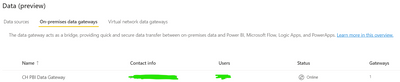
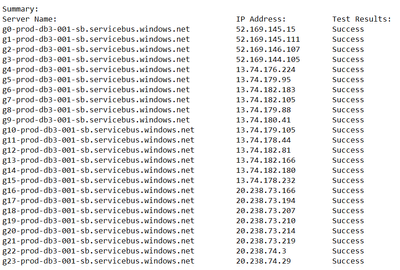
So I installed it on a server device and configured the proxy so the gateway can connect internet. It's visible and online while checking in Power BI Service and the Diagnostic Logs also returns only "succeess" information.
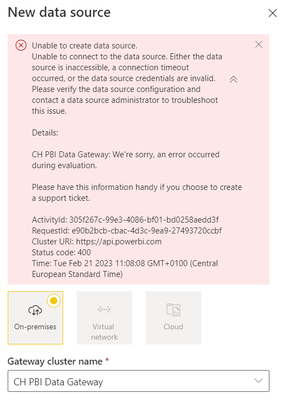
But when I try do add any source to this gateway it returns "Unable to create data source" error. I use exact credentails for PBI Service, Gateway and Sharepoint Source. Same sources works fine with gateway installed on local PC.
Any idea how can I fix the problem?
Hi, @Patriszjo
You can try the following methods.
Solved: Unable to create data source. Invalid connection c... - Microsoft Power BI Community
Solved: Unable to create data source - AWS Athena - Microsoft Power BI Community
Troubleshoot gateways - Power BI | Microsoft Learn
Best Regards,
Community Support Team _Charlotte
If this post helps, then please consider Accept it as the solution to help the other members find it more quickly.
Check out the April 2026 Power BI update to learn about new features.
If you have recently started exploring Fabric, we'd love to hear how it's going. Your feedback can help with product improvements.
A new Power BI DataViz World Championship is coming this June! Don't miss out on submitting your entry.
| User | Count |
|---|---|
| 10 | |
| 10 | |
| 9 | |
| 7 | |
| 7 |
| User | Count |
|---|---|
| 42 | |
| 31 | |
| 26 | |
| 19 | |
| 19 |