cancel
Showing results for 
Search instead for 
Did you mean: 

Join the FabCon + SQLCon recap series. Up next: Power BI, Real-Time Intelligence, IQ and AI, and Data Factory take center stage. All sessions are available on-demand after the live show. Register now

Reply
Enigma
Helper III
Helper III

Enabling multiple users on source data stored on SharePoint

Hi,


The source data of my report comes from three excel files. The data in these files will be updated periodically. These files are stored on SharePoint.


Here's the requirement.
To enable few other users so they can do the data entry in the three excel files, and then update the Power BI report.


Here's what's happening

After they edit and save the excels and click refresh on the report, the report does not update. They all have read, reshare, build permission on the dataset.


How do I achieve this?


Note that

  • They don't have access to the .pbix file, but have access to the published report on the PBI Service.
  • I don't need a scheduled refresh on the report. The users should be able to manually refresh the report after they update the excel files.
1 ACCEPTED SOLUTION

Hi @Enigma ,


  1. Yes, you need to give them access to the workspace as well.
  2. Once  the owner of dataset set the credentials, all the members share it.
  3. First of all, when you refresh the dataset, the report will not immediately display the latest data before you refresh the report. Dataset refresh is a data source refresh to get the latest data. Since the power bi report caches the last state of the current visualization, the report refreshes, fetching the latest data from the dataset to the report.


If this post helps, then please consider Accept it as the solution to help the other members find it more quickly.


Best Regards,

Dedmon Dai

View solution in original post

4 REPLIES 4
Enigma
Helper III
Helper III

Any ideas?

Is it mandatory to have a gateway installed for this purpose? The files are stored on SharePoint.

Hi @Enigma ,


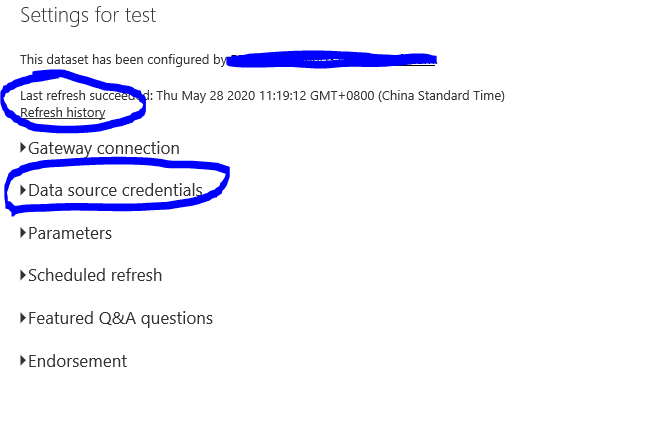
Would you please check the credentials and refresh history for it?

Untitled picture.png

And you should refresh the dataset before you refresh the report:

Untitled picture1.png

If this post helps, then please consider Accept it as the solution to help the other members find it more quickly.


Best Regards,

Dedmon Dai

Thanks @v-deddai1-msft 


Yes, there was an issue with the credentials. I reset them and the refresh started working.

I had a few more questions around this, though.


  1. If I want to allow my teammates to be able to refresh the dataset, is it necessary to give them access to the workspace as well? I had shared the report with them and gave them read, reshare and rebuild access. However, they could see only the report and not the dataset. Only when I gave them access to the workspace, could they see the dataset( and the refresh now option) as well.

  2. I could do the dataset refresh once I reset my credentials. But none of my team mates were asked for their credentials when they performed the dataset refresh. How does this work? Are credentials of only the dataset creator necessary?

  3. What is the difference between refreshing a report and refreshing a dataset? The .pbix file is stored on my local disk. But the source data (excel files) for the report is stored on SharePoint. In this context, what will each refresh do?

Thanks!

Hi @Enigma ,


  1. Yes, you need to give them access to the workspace as well.
  2. Once  the owner of dataset set the credentials, all the members share it.
  3. First of all, when you refresh the dataset, the report will not immediately display the latest data before you refresh the report. Dataset refresh is a data source refresh to get the latest data. Since the power bi report caches the last state of the current visualization, the report refreshes, fetching the latest data from the dataset to the report.


If this post helps, then please consider Accept it as the solution to help the other members find it more quickly.


Best Regards,

Dedmon Dai

Helpful resources

Announcements
April Power BI Update Carousel

Power BI Monthly Update - April 2026

Check out the April 2026 Power BI update to learn about new features.

New to Fabric survey Carousel

New to Fabric Survey

If you have recently started exploring Fabric, we'd love to hear how it's going. Your feedback can help with product improvements.

Power BI DataViz World Championships carousel

Power BI DataViz World Championships - June 2026

A new Power BI DataViz World Championship is coming this June! Don't miss out on submitting your entry.

FabCon and SQLCon Highlights Carousel

FabCon &SQLCon Highlights

Experience the highlights from FabCon & SQLCon, available live and on-demand starting April 14th.