FabCon is coming to Atlanta
Join us at FabCon Atlanta from March 16 - 20, 2026, for the ultimate Fabric, Power BI, AI and SQL community-led event. Save $200 with code FABCOMM.
Register now!- Power BI forums
- Get Help with Power BI
- Desktop
- Service
- Report Server
- Power Query
- Mobile Apps
- Developer
- DAX Commands and Tips
- Custom Visuals Development Discussion
- Health and Life Sciences
- Power BI Spanish forums
- Translated Spanish Desktop
- Training and Consulting
- Instructor Led Training
- Dashboard in a Day for Women, by Women
- Galleries
- Data Stories Gallery
- Themes Gallery
- Contests Gallery
- QuickViz Gallery
- Quick Measures Gallery
- Visual Calculations Gallery
- Notebook Gallery
- Translytical Task Flow Gallery
- TMDL Gallery
- R Script Showcase
- Webinars and Video Gallery
- Ideas
- Custom Visuals Ideas (read-only)
- Issues
- Issues
- Events
- Upcoming Events
Learn from the best! Meet the four finalists headed to the FINALS of the Power BI Dataviz World Championships! Register now
- Power BI forums
- Forums
- Get Help with Power BI
- Service
- Embedded Pricing vs. regular Pro User
- Subscribe to RSS Feed
- Mark Topic as New
- Mark Topic as Read
- Float this Topic for Current User
- Bookmark
- Subscribe
- Printer Friendly Page


- Mark as New
- Bookmark
- Subscribe
- Mute
- Subscribe to RSS Feed
- Permalink
- Report Inappropriate Content
Embedded Pricing vs. regular Pro User
I probably miss something basic...
I embed a Power BI report in an iframe in my website for external users.
Each user is authenticated in MY site and then I just add a &filter=Customers/CustomerID eq '{CustomerID}' in the iframe url - to show them only data relevant to them.
So why do I need the following embed pricing?
https://azure.microsoft.com/en-us/pricing/details/power-bi-embedded/
The Pro user licence works just fine.
What do I miss?
Thanks
Solved! Go to Solution.


- Mark as New
- Bookmark
- Subscribe
- Mute
- Subscribe to RSS Feed
- Permalink
- Report Inappropriate Content
Hi @michaelsh . Sure. Here you have it:
https://docs.microsoft.com/en-us/power-bi/developer/embedded/embedded-faq#how-many-embed-tokens-can-...
Hope that helps.
Happy to help!
- Mark as New
- Bookmark
- Subscribe
- Mute
- Subscribe to RSS Feed
- Permalink
- Report Inappropriate Content
Hi @michaelsh . Sure. Here you have it:
https://docs.microsoft.com/en-us/power-bi/developer/embedded/embedded-faq#how-many-embed-tokens-can-...
Hope that helps.
Happy to help!
- Mark as New
- Bookmark
- Subscribe
- Mute
- Subscribe to RSS Feed
- Permalink
- Report Inappropriate Content
Hi. If you are just embedding with the option from Power Bi Service menu inside the report you are ok. You can embed with Microsoft login or Public to Web. Both of them are ok for pro. The only concern is with Publish to web because it's a public link.
The Power Bi Embed capacity is for a way more complex embed in a custom web app. It's like taking the app to the next level. You can control your own authentication for the app, rls, filters, visualizations etc. The capacity will let you share the reports to users without microsoft account inside your app. You can try this feature without capacity for development purpose, but the microsoft licensing specify that you should buy capacity. You also you have a limited embed tokens for the pro user without capacity.
Hope this make sense.
Happy to help!
- Mark as New
- Bookmark
- Subscribe
- Mute
- Subscribe to RSS Feed
- Permalink
- Report Inappropriate Content
Thanks, @ibarrau - yes, it makes more sense now.
Just to make sure - you say : "The capacity will let you share the reports to users without microsoft account inside your app".....
But this is excactly what I have now. I am authenticating by MY Pro account only and show each user his/hers scile of data by adding ?filter=customerid={id} parameter to iframe url.
(I do not use Publish to Web, I use "Share"-"Embed report" - "Website").
So, my users do not have microsoft power bi account at all.
I still have a feeling that I am missing something important...
- Mark as New
- Bookmark
- Subscribe
- Mute
- Subscribe to RSS Feed
- Permalink
- Report Inappropriate Content
Hi. I can garantee you that your users do have Microsoft account if they are able to see the report. If you "Share - Embed report - Website or Portal" then the result of the iframe is this screen until the user logs in:
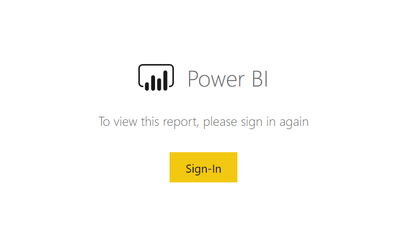
Try copying your link to incognito window of the browser to check it.
The only way to share inside of a web app without user authentication is publish to web or Embed Capacity.
Regards,
Happy to help!
- Mark as New
- Bookmark
- Subscribe
- Mute
- Subscribe to RSS Feed
- Permalink
- Report Inappropriate Content
No, you are wrong, @ibarrau
My users are not Power BI users, they do not sign in.
I do use "Share - Embed report - Website or Portal" link, not "Publish to Web"
I am acuiring the Token for the authentication with my user only. (It's like I am doing the authentication for them)
I just add the ?filter = Customers\Customer eq '{CustomerID}' parameter to the iframe in order to show the relevant data only.
It works and it works with my Pro lisense...
So that is why I am asking - what do I miss?
- Mark as New
- Bookmark
- Subscribe
- Mute
- Subscribe to RSS Feed
- Permalink
- Report Inappropriate Content
Ok. You can create and embed reports with Power bi pro licenses as a developer environment. This token is by user. This means that you have a limited number of embed token requests. One day that user won't work anymore. Microsoft specify that conecting with pro is for development purpose. If you want to go in production you need Embed. The difference is that a workspace with the Embed license will let you create infinite embed tokens.
You have to consider this because it's probably in a Microsoft agreement you might have and if they audit you and find an embed with just pro it might not be good for the company.
Hope that helps,
Happy to help!
- Mark as New
- Bookmark
- Subscribe
- Mute
- Subscribe to RSS Feed
- Permalink
- Report Inappropriate Content
Awesome, thanks, @ibarrau !
Can you please post a link to this limitation?
I canot find anything about it.
Thank you!

Helpful resources

Join our Fabric User Panel
Share feedback directly with Fabric product managers, participate in targeted research studies and influence the Fabric roadmap.

Power BI Monthly Update - February 2026
Check out the February 2026 Power BI update to learn about new features.

FabCon Atlanta 2026
Join us at FabCon Atlanta, March 16-20, for the ultimate Fabric, Power BI, AI and SQL community-led event. Save $200 with code FABCOMM.


