Get certified for free when you join Fabric Data Days 2026 and dive into Fabric, Power BI, SQL, AI, and other essential data skills.
Join nowJuly 7 - July 17 | Round 2 of the Power BI Dataviz World Championships. Don't miss your chance! Learn more
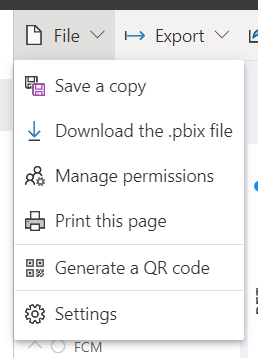
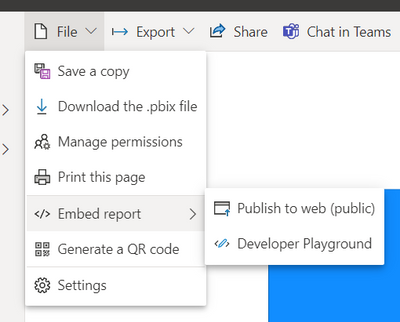
I wanted to embed a PBI report but the File>Embed button is missing.
I've read regarding the requiring admin to enable the embed function but the weird thing is another different PBI report has the option to embed.
Both of this reports are connected to the same dataset.
Is there a reason for this inconsistency that I didn't know about? I have tried re-publish the report to no avail.
Hi @Anonymous
It looks like you're on a Power BI Free licence, which means the only sharing facility you have is "publish to web". Please be aware that "Publish to web" hosts your report on a public facing web server, so it can be found by others searching. That said, there are several reasons you may not be seeing "Publish to web".
Publish to web is supported for the vast majority of data sources and reports in the Power BI service. However, the following kinds of reports aren't currently supported or available with Publish to web:
Hope this helps
Stuart
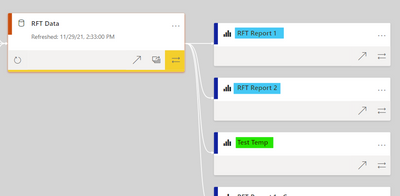
Hi @Burningsuit. Thank you for replying. I've checked through the list you've provided and here's the summary:
The report highlighted in blue doesn't have the option to embed but the one highlighted in green have the option. Eventhough they are all connected to the same dataset.
Hi, @Anonymous
What's your data source? Does other reports in the workspace (not related to the problematic report) have this problem?
Best Regards,
Community Support Team _ Janey
Join us in Barcelona for FabCon and SQLCon, the Fabric, Power BI, SQL, and AI community event. Save €200 with code FABCMTY200.
Join Fabric Data Days 2026: 60 days of free live/on-demand sessions, challenges, study groups, and certification opportunities.
| User | Count |
|---|---|
| 16 | |
| 14 | |
| 9 | |
| 8 | |
| 8 |
| User | Count |
|---|---|
| 32 | |
| 29 | |
| 27 | |
| 25 | |
| 25 |