
cancel
Showing results for 
Search instead for 
Did you mean: 

The Power BI Data Visualization World Championships is back! Get ahead of the game and start preparing now! Learn more

Reply
Macek2017
New Member

Edx training - Lab 4

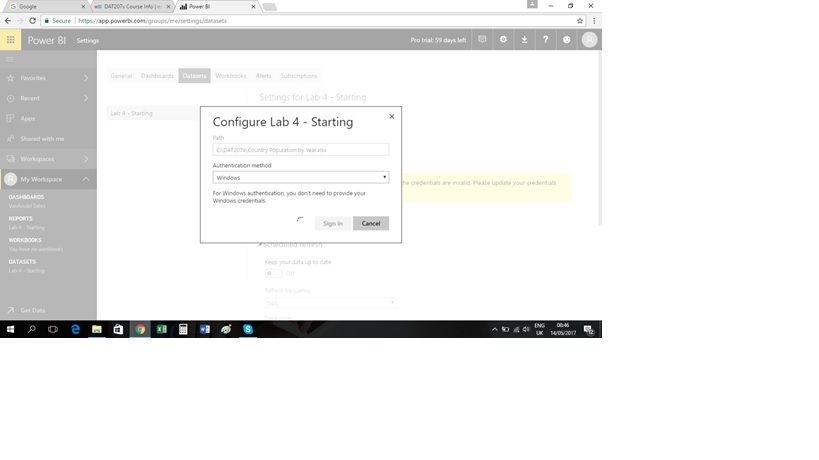
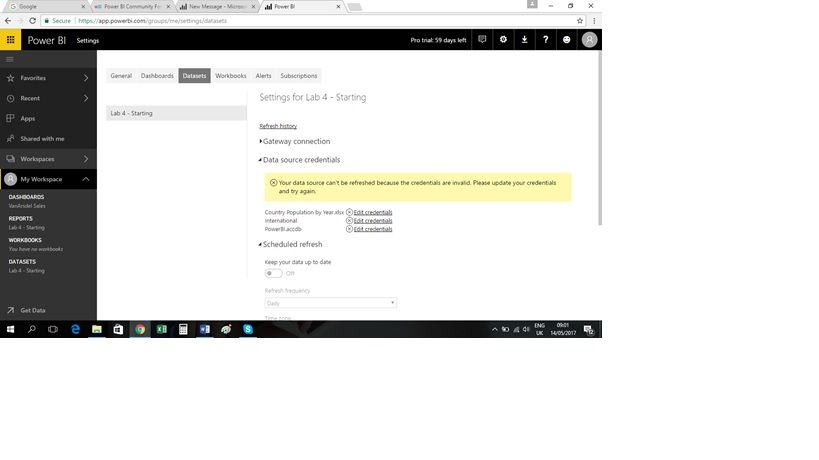
In the EDx training, I 'm having difficulties in Lab 4 with setting up an automated refresh of data. I set up the personal gateway without a problem but am getting error messages that my credentials are incorrect. When I click on the hyperlink, it's trying to authenticate through Windows but it's just hanging and nothing's happening.


Any idea where I'm going wrong/what's happening?


Thanks


Configure dataset.jpgEdit Credentials.jpg

2 ACCEPTED SOLUTIONS
v-huizhn-msft
Microsoft Employee
Microsoft Employee

Hi @Macek2017,

I reproduce your scenario, the error caused by two reasons. First reason is you changed your computer account or password, but you don't update the credentials. The second reason is you need to update your lasted version. Please troubleshoot according to the following steps. Don't hesite to ask if you still have any issue.

1. In your local computer, double click your personal gateway, sign in using your new account and password.

3.png

2. If the gateway connected successfully after the step1. You need to download the lastest version here. And install it, reconfigure it. Then it will prompt you edit credentials for your dataset model like the following screenshot.

2.PNG
3. Then you click Edit data resource->sign in. You'll set it successfully.

For more details, you can review this article.

Best Regards,
Angelia

View solution in original post

That worked. Thank you.

View solution in original post

2 REPLIES 2
v-huizhn-msft
Microsoft Employee
Microsoft Employee

Hi @Macek2017,

I reproduce your scenario, the error caused by two reasons. First reason is you changed your computer account or password, but you don't update the credentials. The second reason is you need to update your lasted version. Please troubleshoot according to the following steps. Don't hesite to ask if you still have any issue.

1. In your local computer, double click your personal gateway, sign in using your new account and password.

3.png

2. If the gateway connected successfully after the step1. You need to download the lastest version here. And install it, reconfigure it. Then it will prompt you edit credentials for your dataset model like the following screenshot.

2.PNG
3. Then you click Edit data resource->sign in. You'll set it successfully.

For more details, you can review this article.

Best Regards,
Angelia

That worked. Thank you.

Helpful resources

Announcements
Power BI DataViz World Championships

Power BI Dataviz World Championships

The Power BI Data Visualization World Championships is back! Get ahead of the game and start preparing now!

December 2025 Power BI Update Carousel

Power BI Monthly Update - December 2025

Check out the December 2025 Power BI Holiday Recap!

FabCon Atlanta 2026 carousel

FabCon Atlanta 2026

Join us at FabCon Atlanta, March 16-20, for the ultimate Fabric, Power BI, AI and SQL community-led event. Save $200 with code FABCOMM.