
Join us at FabCon Atlanta from March 16 - 20, 2026, for the ultimate Fabric, Power BI, AI and SQL community-led event. Save $200 with code FABCOMM.
Register now!The Power BI Data Visualization World Championships is back! Get ahead of the game and start preparing now! Learn more
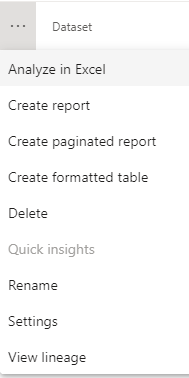
I have a published dataset in a workspace which I want to edit, to set row level security, but there is no download option, I can only build a report on it. This dataset was published by InfoBurst without a report. I have contributor permission in the workspace, so normally I can download a dataset.
Is there a way to edit datasets which are not published using the Power BI Desktop?
Hi @revin07
Thanks for reaching out to us.
>>Is there a way to edit datasets which are not published using the Power BI Desktop?
Can you provide a screenshot of the interface for editing the dataset? Because as far as I know, even if it is a dataset from a report uploaded by Power BI Desktop, it cannot be edited on the Service.
Best Regards,
Community Support Team _Tang
If this post helps, please consider Accept it as the solution to help the other members find it more quickly.
Hi,
I do not want edit it in the Service, I would like to open it in the desktop app, but I cannot download it.
I was wondering if this is a uniqe case, or is there a workaround for it?
Thanks in advance!
Hi @revin07
Thanks for your reply.
Please try to download its report, if there is no report, create a report based on the dataset and then download the report.
Best Regards,
Community Support Team _Tang
If this post helps, please consider Accept it as the solution to help the other members find it more quickly.
I created a report on the dataset, published it, and then downloaded it, but I still cannot edit the dataset itself. Most of the Modeling functions are disabled, I cannot set row level security.
The Power BI Data Visualization World Championships is back! Get ahead of the game and start preparing now!
Check out the November 2025 Power BI update to learn about new features.