Share feedback directly with Fabric product managers, participate in targeted research studies and influence the Fabric roadmap.
Sign up nowGet Fabric certified for FREE! Don't miss your chance! Learn more
HI,
I have data like below for orders table and roles table.
Roles table:
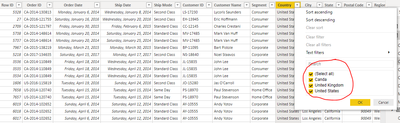
Orders table.
Now Orders tables has 3 countries, US, UK, canada and Roles table has which country data accessed by which user.
Now based on user login to the report Orders table data has to be filtered with RLS.
How to do that?
As of now i dont have any relationship between these 2 tables.
Kindly help
@needhelp @Pragati11 @MFelix @amitchandak @GilbertQ @lbendlin @Greg_Deckler
Solved! Go to Solution.
Hi @Anonymous ,
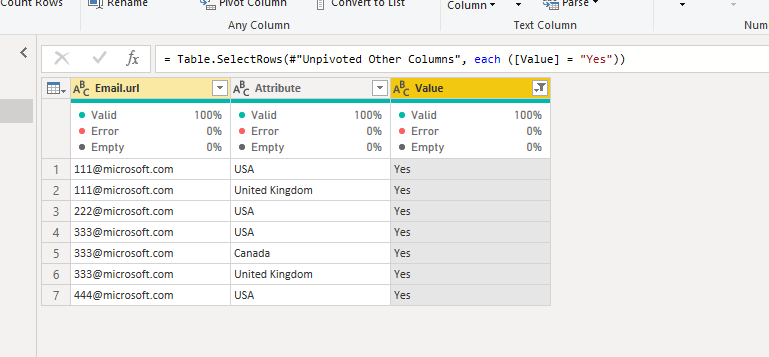
I suggest you unpivot you role table and filter it to yes :
And create a relationship between your order table and role table by Attribute column and Country column. Then follow the steps in https://radacad.com/dynamic-row-level-security-with-power-bi-made-simple to create dynamic rls.
If this post helps, then please consider Accept it as the solution to help the other members find it more quickly.
Best Regards,
Dedmon Dai
Hi @Anonymous ,
You can refer following articles on how to approach Row-level security in Power BI:
https://radacad.com/what-do-you-need-to-implement-dynamic-row-level-security-in-power-bi
https://www.sqlshack.com/introduction-to-row-level-security-in-power-bi/
Thanks,
Pragati
@Pragati11 Hi Pragati provided links will not help to my situation.
Here i would like filter dataset based on login user in Dynamic way with RLS.
Hi @Anonymous ,
I suggest you unpivot you role table and filter it to yes :
And create a relationship between your order table and role table by Attribute column and Country column. Then follow the steps in https://radacad.com/dynamic-row-level-security-with-power-bi-made-simple to create dynamic rls.
If this post helps, then please consider Accept it as the solution to help the other members find it more quickly.
Best Regards,
Dedmon Dai
If you love stickers, then you will definitely want to check out our Community Sticker Challenge!
Check out the January 2026 Power BI update to learn about new features.
| User | Count |
|---|---|
| 51 | |
| 42 | |
| 30 | |
| 27 | |
| 25 |