Don't miss your chance to take the Fabric Data Engineer (DP-600) exam for FREE! Find out how by attending the DP-600 session on April 23rd (pacific time), live or on-demand.
Learn moreNext up in the FabCon + SQLCon recap series: The roadmap for Microsoft SQL and Maximizing Developer experiences in Fabric. All sessions are available on-demand after the live show. Register now
Hi,
I want to display value which is as described below.
My calculation is like this
var a =Distinct count of value 1
var b= Count of Value 2
var ans=b/a
I want to display ans as my result.
But Problem is there I have multiple records for all records. That means for value 1 (distinct) I got multiple values. So my calculation is not properly set as my requirement. So please help me in this case. If Found Unique count that is based on multiple column(value 1 and value 2) for var b.
Thanks.
Solved! Go to Solution.
Hi @Krunalbpatel,
Please change the formula of var b to the following formula:
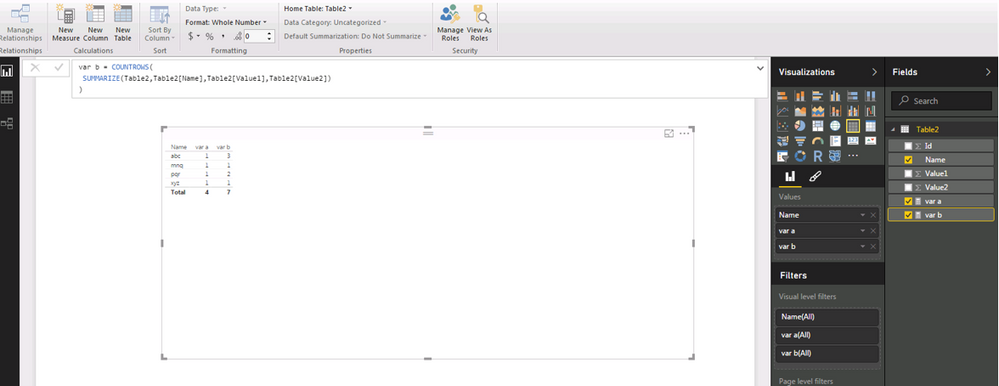
var b = COUNTROWS( SUMMARIZE(Table,Table[Name],Table[Value1],Table[Value2]) )
I create a table visual to display your expected result. For more details, you can review the example in this attached PBIX file:https://1drv.ms/u/s!AhsotbnGu1NogXByWhS2F551DemE.
Thanks,
Lydia Zhang
Hi Krunal,
Happy to help you with this. Please provide a snapshot of data and what are you trying to achieve.
Regards
Bhavesh
Hi,
I have data like this
Id Name Value1 Value2
1 abc 1 1
2 abc 1 2
3 abc 1 3
4 pqr 2 1
5 pqr 2 2
6 abc 1 1
7 abc 1 2
8 mnq 3 1
9 pqr 2 1
10 xyz 4 2
Now my calculation is like this
var a = DISTINCTCOUNT(value1)
var b = COUNT(Value2)
My result wold give me like
abc 1 - 5
pqr 1 - 3
mnq 1 - 1
xyz 1 - 1
But I need
abc 1 - 3
pqr 1 - 2
mnq 1 - 1
xyz 1 - 1
For this I need to count distinct on multiple column so
1 abc 1 1
6 abc 1 1
this will result only 1
Thanks And Regards
Krunal Patel
Hi @Krunalbpatel,
Please change the formula of var b to the following formula:
var b = COUNTROWS( SUMMARIZE(Table,Table[Name],Table[Value1],Table[Value2]) )
I create a table visual to display your expected result. For more details, you can review the example in this attached PBIX file:https://1drv.ms/u/s!AhsotbnGu1NogXByWhS2F551DemE.
Thanks,
Lydia Zhang
Hi Lydia Zhang,
Thank you for your reply. I got my solution and its works fine for me.
Thanks and Regards,
Krunal Patel
Hi Krunalbpatel,
Test= SUMX(DISTINCT('Table'[Value2]),CALCULATE( VALUES('Table' [Value2])))
I hope this helps,
Christian
Hi cosborn1231,
No This will not help me. In this case I got the sum of distinct values but I want the distinct value count against value 1.
Thanks and Regards,
Krunal Patel
If you have recently started exploring Fabric, we'd love to hear how it's going. Your feedback can help with product improvements.
A new Power BI DataViz World Championship is coming this June! Don't miss out on submitting your entry.
Experience the highlights from FabCon & SQLCon, available live and on-demand starting April 14th.
| User | Count |
|---|---|
| 11 | |
| 10 | |
| 9 | |
| 8 | |
| 8 |