Don't miss your chance to take exam DP-600 or DP-700 on us!
Request nowLearn from the best! Meet the four finalists headed to the FINALS of the Power BI Dataviz World Championships! Register now
Hello,
Interesting question --
I am tracking the training runs for a team and would like to show the team how far they are miles-wise between two points.
Our starting point is Manchester, NH.
We set our team goal for miles at 3,924 miles... and Ersa, Corsica was the closest point on our same latitude directly east.
SO, I'm trying to figure out how I can plot now far we are on our way to Corsica.
So let's say, we've run 400 miles as a team so far. I'd like to plot the point 400 miles directly east of Manchester, NH, but then update that as we move on in our training.
I'm wondering if I should create a data set that has long and lat for certain mile increments, let's say every 25 miles until we reach Corsica and then plug in our current mileage to show which point is closest on the map?
Wondering if anyone else has thoughts!
Thanks in advance!
Hi @heidibb,
In your scenario, you can create a Excel workbook to draw lines between two points on the map, then import the workbook to Power BI Desktop. See: Drawing Lines On Maps With Power Map And Power Query.
Also please take a look at ankitpatira's R script visual: R script and R visuals in Power BI.
If you have any question, please feel free to ask.
Best Regards,
Qiuyun Yu
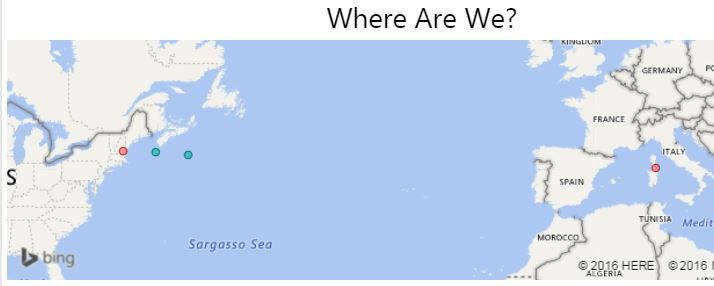
Thanks @v-qiuyu-msft, this is a little more advanced/complicated than I was hoping! I ended up doing a file with long and lat coordinates ever 250 miles to plot the points, I just can't put a line between them. I also mapped out the coordinates for the "legs" of the actual race in the same way. Again, just no way to put a line between each point that I can figure out.
My data for the team goal map looks like this. The Dest_Lat and Dest_Long populates in my source data (google sheet) using a formula that says if "Where Are We" > "Mile Point" then Lat (or long).
It cut off the bottom of my message for some reason. My map ended up looking like this... the next point will show when we surpass the 750 mile mark. Just not able to draw a line between points.
Share feedback directly with Fabric product managers, participate in targeted research studies and influence the Fabric roadmap.
Check out the February 2026 Power BI update to learn about new features.
| User | Count |
|---|---|
| 20 | |
| 18 | |
| 11 | |
| 11 | |
| 7 |
| User | Count |
|---|---|
| 43 | |
| 38 | |
| 21 | |
| 21 | |
| 17 |