
Join us at FabCon Atlanta from March 16 - 20, 2026, for the ultimate Fabric, Power BI, AI and SQL community-led event. Save $200 with code FABCOMM.
Register now!View all the Fabric Data Days sessions on demand. View schedule
Hello,
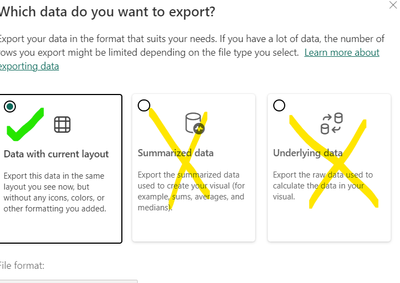
I am working on my report in Power BI Service and When exporting data, I wanted to disable Summarized data and Underlying Data
I checked and I came across the solution where you go to Option and Settings>>Report Settings>>Export Data and choose one of the following options
But I wanted to keep the feature of exporting data with current layout and not underlying and summarized data. Is there a way to disable them?
Solved! Go to Solution.
Hi @deepanwita25 ,
Currently this feature is not available in power bi to separately disable summarized and underlying data. We have to go with the options available in Report Setting 😞
Thanks,
Pallavi
Hello Pallavi,
Thank you for the answer.
Hi @deepanwita25 ,
Currently this feature is not available in power bi to separately disable summarized and underlying data. We have to go with the options available in Report Setting 😞
Thanks,
Pallavi
Check out the November 2025 Power BI update to learn about new features.
Advance your Data & AI career with 50 days of live learning, contests, hands-on challenges, study groups & certifications and more!