cancel
Showing results for 
Search instead for 
Did you mean: 

The Power BI Data Visualization World Championships is back! Get ahead of the game and start preparing now! Learn more

Reply
hr_tetra
Helper I
Helper I

Directquery refresh in PBI service in mixed mode - was working, now it is not

I have an SQL connection in directquery and added to calculated tables for dimension purposes. This was working well until yesterday, and i was able to refresh the report every 15m in the PBI service ("live status dashboard").


We had a power outage yesterday and after reconnecting to the server I can only do import mode refresh for this report. If I remove the calculated tables (import mode) then directquery and refresh is possible every 15m again. 


But it did work in mixed mode before, so why not now? And I have another mixed mode report not affected by the outage, that is still working like a directquery report on the PBI service...


Or is it possible to add support/dimension tables in directquery mode?

1 ACCEPTED SOLUTION

Hi Polly,


Thanks a lot for the tips! I will try them out.


However I found workaround where I posted only the direct query dataset to PBI service, and then connected through a live connection with another report file. This will auto-update in service as long as the live-connected directquery is updating.


I also spoke to Msft-support, and they had an even better solution where the support/dimension tables where posted to PBI service, and then you connect to that PBI service file instead, and the pbi file will stay in directquery mode even with the support/dim-tables.


Another problem was to add the date in one directquery connection in postresql. When changed from datetime to date it would go from -4 to 0 GMT, so after 8pm it would go to the next date. Directquery and dates can be tricky, but it worked by adding this DAX as a calc column in text format - this will connect with a dim-date table with date formatted as 10/13/2021:


Calculated Column = MONTH('rd_core waste_level_metric_trajectory'[Stamp min 4]) & "/" & DAY('dataset'[Stamp min 4]) & "/" & YEAR('dataset'[Stamp min 4])

View solution in original post

2 REPLIES 2
Anonymous
Not applicable

Hi @hr_tetra ,


The following conditions may exist.

  • Something is wrong with the gateway. When  a power outage and the data is being refreshed.Data is temporarily stored on the gateway machine.

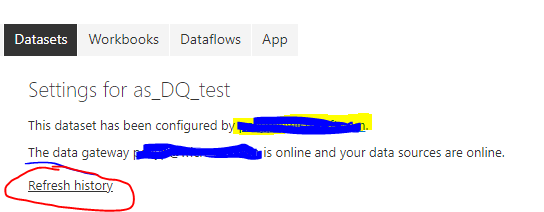
Select Dataset>> Settings>>refresh history


 66.png


If refresh failed, please show the details. Please refer to this document about the Composite models: 

https://docs.microsoft.com/en-us/power-bi/service-dataset-modes-understand#composite-mode


  •  Maybe something is wrong with credentials. Select Dataset>>settings>> Data source credentials. Make sure the credentials are correct.


Here are the ways may help you.

  • Republish the pbix file.
  • Reconfigure data credentials.
  • Reset Schedule refresh.


Best Regards

Community Support Team _ polly


If this post helps, then please consider Accept it as the solution to help the other members find it more quickly.

Hi Polly,


Thanks a lot for the tips! I will try them out.


However I found workaround where I posted only the direct query dataset to PBI service, and then connected through a live connection with another report file. This will auto-update in service as long as the live-connected directquery is updating.


I also spoke to Msft-support, and they had an even better solution where the support/dimension tables where posted to PBI service, and then you connect to that PBI service file instead, and the pbi file will stay in directquery mode even with the support/dim-tables.


Another problem was to add the date in one directquery connection in postresql. When changed from datetime to date it would go from -4 to 0 GMT, so after 8pm it would go to the next date. Directquery and dates can be tricky, but it worked by adding this DAX as a calc column in text format - this will connect with a dim-date table with date formatted as 10/13/2021:


Calculated Column = MONTH('rd_core waste_level_metric_trajectory'[Stamp min 4]) & "/" & DAY('dataset'[Stamp min 4]) & "/" & YEAR('dataset'[Stamp min 4])

Helpful resources

Announcements
Power BI DataViz World Championships

Power BI Dataviz World Championships

The Power BI Data Visualization World Championships is back! Get ahead of the game and start preparing now!

December 2025 Power BI Update Carousel

Power BI Monthly Update - December 2025

Check out the December 2025 Power BI Holiday Recap!

FabCon Atlanta 2026 carousel

FabCon Atlanta 2026

Join us at FabCon Atlanta, March 16-20, for the ultimate Fabric, Power BI, AI and SQL community-led event. Save $200 with code FABCOMM.