cancel
Showing results for 
Search instead for 
Did you mean: 

Vote for your favorite vizzies from the Power BI Dataviz World Championship submissions. Vote now!

Reply
Anonymous
Not applicable

Direct Query for today wont refresh overnight

Hi,


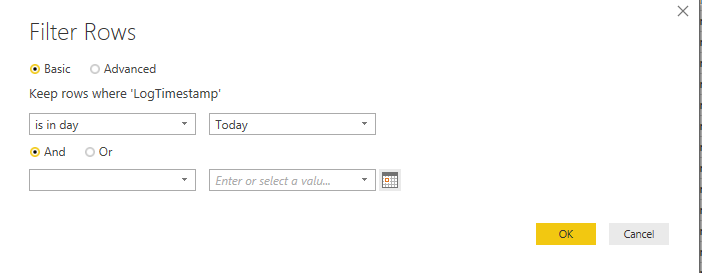
I have a report which is built on a Direct Query to an SQL server. This brings in real time data for today only. I have the following filter in place:

filter rows.png


I then publish the report and set a browser to refresh the page every minute to get a real time dashboard on a screen.


The problem is at midnight it doesn't start to report on the next day, it says on the day it was last published. To get around this I have to go into Desktop and refresh the data and republish the report. This is not something that I should have to do surly.


Is there a way to make it so it reports on the current day only and automatically ticks over to the current/next day at midnight?

1 ACCEPTED SOLUTION
v-danhe-msft
Microsoft Employee
Microsoft Employee

Hi @Anonymous,

Could you have tried with the SQL Statement to filter your data before you get your data?

Based on my test, you could use the GETDATE ( ) function (https://docs.microsoft.com/en-us/sql/t-sql/functions/getdate-transact-sql?view=sql-server-2017#b-getting-the-current-system-date) to get today's data.

1.PNG

Regards,

Daniel He

Community Support Team _ Daniel He
If this post helps, then please consider Accept it as the solution to help the other members find it more quickly.

View solution in original post

4 REPLIES 4
v-danhe-msft
Microsoft Employee
Microsoft Employee

Hi @Anonymous,

Could you please tell me if your problem has been solved? If it is, could you please mark the helpful replies as Answered to close this topic?


Regards,

Daniel He

Community Support Team _ Daniel He
If this post helps, then please consider Accept it as the solution to help the other members find it more quickly.
Anonymous
Not applicable

Hi Daniel,


Thanks for the help. I've not tried this yet but it looks like it could work. I will let you know when I have tried it.

Anonymous
Not applicable

Hi @v-danhe-msft 


I have made changes to the Advnaced SQL import as you suggested and added the other filters etc as you can't mix and match it seems. It's running fine for now but we will see if it updates correctly tomorrow. Fingers crossed. 

v-danhe-msft
Microsoft Employee
Microsoft Employee

Hi @Anonymous,

Could you have tried with the SQL Statement to filter your data before you get your data?

Based on my test, you could use the GETDATE ( ) function (https://docs.microsoft.com/en-us/sql/t-sql/functions/getdate-transact-sql?view=sql-server-2017#b-getting-the-current-system-date) to get today's data.

1.PNG

Regards,

Daniel He

Community Support Team _ Daniel He
If this post helps, then please consider Accept it as the solution to help the other members find it more quickly.

Helpful resources

Announcements
Power BI DataViz World Championships

Power BI Dataviz World Championships

Vote for your favorite vizzies from the Power BI World Championship submissions!

Sticker Challenge 2026 Carousel

Join our Community Sticker Challenge 2026

If you love stickers, then you will definitely want to check out our Community Sticker Challenge!

January Power BI Update Carousel

Power BI Monthly Update - January 2026

Check out the January 2026 Power BI update to learn about new features.

FabCon Atlanta 2026 carousel

FabCon Atlanta 2026

Join us at FabCon Atlanta, March 16-20, for the ultimate Fabric, Power BI, AI and SQL community-led event. Save $200 with code FABCOMM.