This time we’re going bigger than ever. Fabric, Power BI, SQL, AI and more. We're covering it all. You won't want to miss it.
Learn moreDid you hear? There's a new SQL AI Developer certification (DP-800). Start preparing now and be one of the first to get certified. Register now
Hi all
I have a direct query setup.
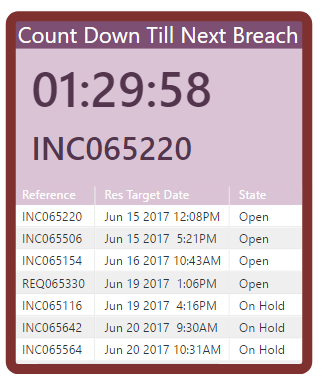
I have a Report build, that is used to pull about 50 rows of data, and display a count down clock till a Target Date is breached.
This is perfect for me.
However i need the refresh rate to be under 5 minutes.
The limitation of the system, is 15 minute refresh rate.
How can I get around this?
I cant use an API - as the Dashboard page doesnt have this functionality to display the equivilent of the Reports page.
Any suggestions would be helpful.
Solved! Go to Solution.
@Acyrus1992 Did you create an API and then when creating the dataset in Power BI use the "Push URL" that was generated as the API Endpoint?
@Acyrus1992 The only way of achieving this would be using an API - streaming or push dataset. See here. On a streaming dataset you can use reports if you enable the "Historical Data Analysis", or use a push dataset.
Hi Eno1978
Thank you for the direction.
I have clicked - Historic data analysis, to On
And each time, it changes itself to Off
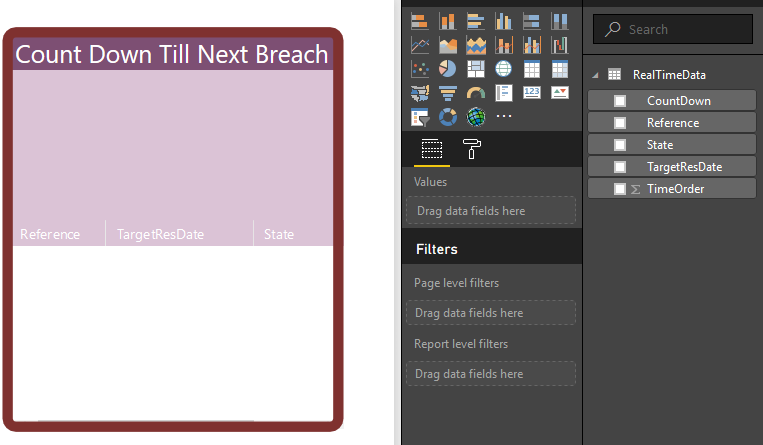
I am able to use the RealTimeData set now in the HTML Report Editor, to build the report correctly - however its all black at the moment with no data?
Have I missed a step somewhere?
Regards
@Acyrus1992 Did you create an API and then when creating the dataset in Power BI use the "Push URL" that was generated as the API Endpoint?
Thank you
That did the trick!
Check out the April 2026 Power BI update to learn about new features.
If you have recently started exploring Fabric, we'd love to hear how it's going. Your feedback can help with product improvements.
A new Power BI DataViz World Championship is coming this June! Don't miss out on submitting your entry.
| User | Count |
|---|---|
| 11 | |
| 9 | |
| 8 | |
| 8 | |
| 8 |
| User | Count |
|---|---|
| 49 | |
| 32 | |
| 27 | |
| 21 | |
| 20 |