Don't miss your chance to take the Fabric Data Engineer (DP-600) exam for FREE! Find out how by watching the DP-600 session on-demand now through April 28th.
Learn moreJoin the FabCon + SQLCon recap series. Up next: Power BI, Real-Time Intelligence, IQ and AI, and Data Factory take center stage. All sessions are available on-demand after the live show. Register now
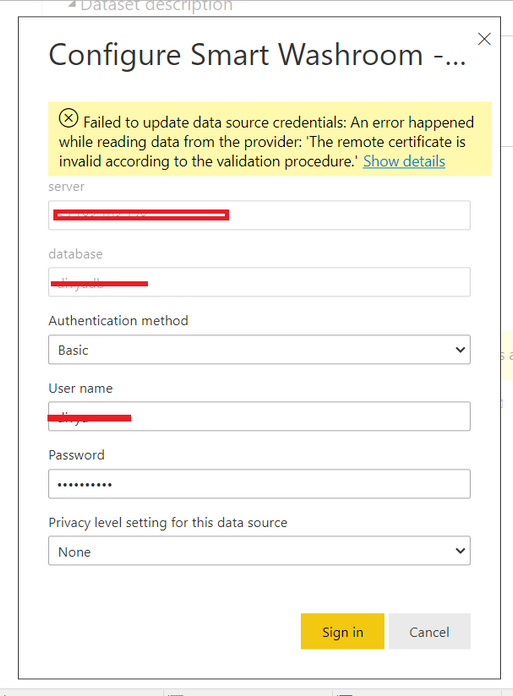
Hello, my conecction works at desktop level, but when I upload it to Power BI Web it does not work.
In Desktop PostgreSQL is connect but I disable encryption from database seeting, this will give any issue.
Hi @mohittimpus ,
The installed database provider 'Npgsql' targets an incompatible .NET Framework. Please install Npgsql version 4.0.10.0 or earlier" and make sure that you select NpgSQL GAC Installation.Then restart the pc.
I found an alternative——You can connect PostgreSQL using ODBC Connection.Please kindly refer to: https://newbedev.com/an-error-happened-while-reading-data-from-the-provider-the-remote-certificate-i...
Similar threadS:
https://community.powerbi.com/t5/Service/Connecting-Postgres-on-AWS-from-PowerBI-Web/m-p/1064295
Best Regards,
Eyelyn Qin
If this post helps, then please consider Accept it as the solution to help the other members find it more quickly.
But this Solution only work in Desktop level.
Problem I have when I published reprot on Power BI services account and add connection there.So that time it give this type of error.
I connect vai direct query.
Check out the April 2026 Power BI update to learn about new features.
If you have recently started exploring Fabric, we'd love to hear how it's going. Your feedback can help with product improvements.
A new Power BI DataViz World Championship is coming this June! Don't miss out on submitting your entry.
| User | Count |
|---|---|
| 9 | |
| 8 | |
| 8 | |
| 8 | |
| 7 |