Don't miss your chance to take exam DP-600 or DP-700 on us!
Request nowLearn from the best! Meet the four finalists headed to the FINALS of the Power BI Dataviz World Championships! Register now
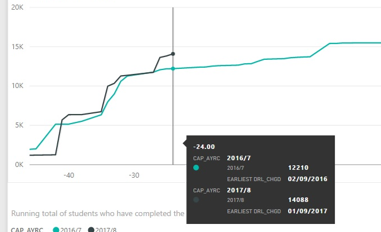
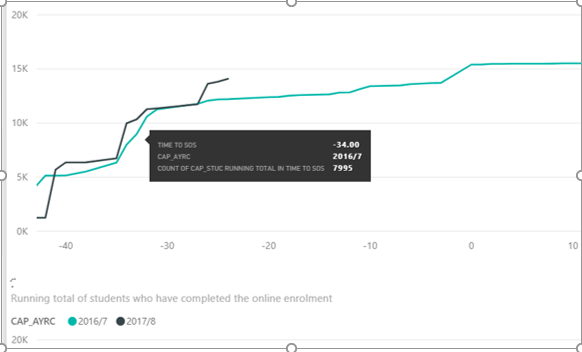
The tool tips for line charts appear differently in the service and desktop. In the service it shows the single value on a single line you hover over whereas in the desktop it shows the values for all lines at that point (see images). Is this deliberate, a setting I’m mising or a bug?
Desktop
Service
Solved! Go to Solution.
Hi @MattG,
I just verified that the tooltips works in the same way on both Power BI Desktop and service.
Does this issue happens to all the line charts or a specific line chart on your report?
Have you tried recreating the Line chart on the latest version of Power BI Desktop, and then republish the report to your service to see if the issue disappears? ![]()
Regards
Hi @MattG,
I just verified that the tooltips works in the same way on both Power BI Desktop and service.
Does this issue happens to all the line charts or a specific line chart on your report?
Have you tried recreating the Line chart on the latest version of Power BI Desktop, and then republish the report to your service to see if the issue disappears? ![]()
Regards
Hi
Thanks, I guess it's some weirdness with my data.
Matt
Share feedback directly with Fabric product managers, participate in targeted research studies and influence the Fabric roadmap.
Check out the February 2026 Power BI update to learn about new features.