cancel
Showing results for 
Search instead for 
Did you mean: 

We've captured the moments from FabCon & SQLCon that everyone is talking about, and we are bringing them to the community, live and on-demand. Starts on April 14th. Register now

Reply
Vincent112358
Frequent Visitor

Difference DateTime between Desktop and Service

Hi All,


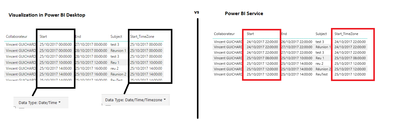
I have a bug with a rapport in Power BI. When I use Power Desktop, the date is in local settings (French). But when I publish my dsahboard on Service, the Date is in UTC.


datetime.png

I try two option for the type of the field Start (Date/Time and Date/Time/TimeZone). But the both is KO


Thanks in advance for your answer,


Best Regards


1 ACCEPTED SOLUTION
v-sihou-msft
Microsoft Employee
Microsoft Employee

@Vincent112358


For Date column, it will always show UTC time on Power BI Service, you can create a custom column and use DataTimeZone functions to set time zone. For more details, please refer to articles below:


Solving DAX Time Zone Issue in Power BI

Daylight Saving Time And Time Zones In M


Regards,

View solution in original post

2 REPLIES 2
v-sihou-msft
Microsoft Employee
Microsoft Employee

@Vincent112358


For Date column, it will always show UTC time on Power BI Service, you can create a custom column and use DataTimeZone functions to set time zone. For more details, please refer to articles below:


Solving DAX Time Zone Issue in Power BI

Daylight Saving Time And Time Zones In M


Regards,

@v-sihou-msft


Thanks for your answer. I have always saw this tips but in French, we are in UTC+1 in winter but in UTC+2 in summer.

So, I can not just add one (or two) hour.


I find a solution by using a calendar table. In this table, I add a field who give the numbers of hours to add depending on the date.


Helpful resources

Announcements
New to Fabric survey Carousel

New to Fabric Survey

If you have recently started exploring Fabric, we'd love to hear how it's going. Your feedback can help with product improvements.

Power BI DataViz World Championships carousel

Power BI DataViz World Championships - June 2026

A new Power BI DataViz World Championship is coming this June! Don't miss out on submitting your entry.

Join our Fabric User Panel

Join our Fabric User Panel

Share feedback directly with Fabric product managers, participate in targeted research studies and influence the Fabric roadmap.

March Power BI Update Carousel

Power BI Community Update - March 2026

Check out the March 2026 Power BI update to learn about new features.