Join us at FabCon Atlanta from March 16 - 20, 2026, for the ultimate Fabric, Power BI, AI and SQL community-led event. Save $200 with code FABCOMM.
Register now!The Power BI Data Visualization World Championships is back! Get ahead of the game and start preparing now! Learn more
I shared a PowerBI report in my organization. All users display it without problem.
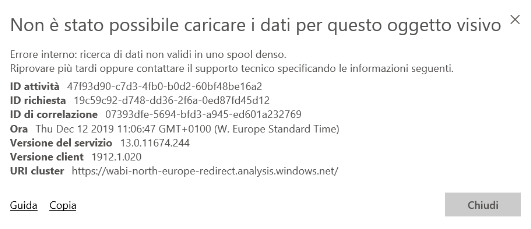
Except one of thos that receives an unexpected error: Dense Spool.
I added this user like owner of the workspace but he has Same error.
He has Win10 and tried IE and also Chrome. Same error.
Memory usage: 60%, CPU:50% free
Any idea ?.
Thanks,
Bye
Andrea
Solved! Go to Solution.
Hi @AndreVar67 ,
Glad to hear that you have resolved your problem. Thank you for sharing this wonderful solution, we believe it can benefit more users. If you have any other questions about this scenario, please kindly ask here and we will try to resolve it.
Best regards,
Hi @AndreVar67 ,
How about the result after you follow the suggestions mentioned in my original post?Could you please provide more details about it If it doesn't meet your requirement?
Best regards,
Hi @v-lid-msft
Error solved when I moved the report and the users in a new PowerBi workspace.
Previous created at the end of 2018 (now decommisisoned).
Thanks
BR
Andrea Varoli
Hi @AndreVar67 ,
Glad to hear that you have resolved your problem. Thank you for sharing this wonderful solution, we believe it can benefit more users. If you have any other questions about this scenario, please kindly ask here and we will try to resolve it.
Best regards,
Hi @AndreVar67 ,
Does this error occur before? Are there only some visual can not display? If the special visual contain some measure, cound you please try to add +0 to the end of some calculate result:
For example result = MINA('Table'[Column]) to result = MINA('Table'[Column])+0
Best regards,
The Power BI Data Visualization World Championships is back! Get ahead of the game and start preparing now!