cancel
Showing results for 
Search instead for 
Did you mean: 

The Power BI Data Visualization World Championships is back! Get ahead of the game and start preparing now! Learn more

Reply
kintera
Helper I
Helper I

Debug Sharepoint Embed vs Service

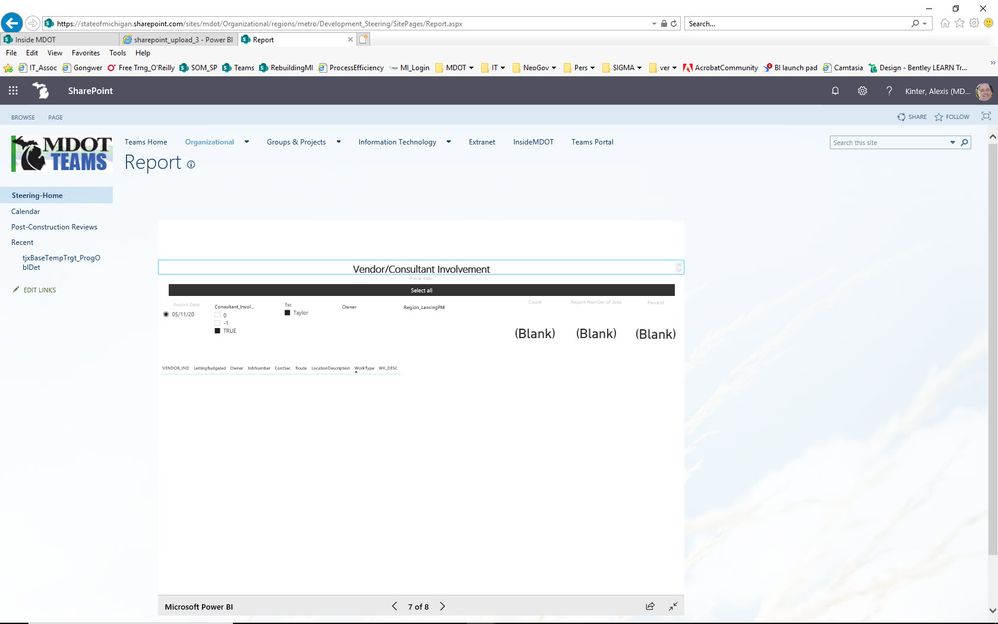
I am seeing things differently on a Sharepoint embed than on the service (see attached images) I republished, but didn't change the file. I've waited for propagation also. It's only on one report. Any ideas?

Thank you in advance


pbi_embed.jpgpbi_service.jpg

1 ACCEPTED SOLUTION
v-diye-msft
Community Support
Community Support

Hi @kintera 


 I  would suggest you use Edge/Google Chrome, they are the most compatible browsers for power bi.


Note the limitation:

  • Error: "An error occurred, please try logging out and back in and then revisiting this page. Correlation ID: undefined, http response status: 400, server error code 10001, message: Missing refresh token"

    If you receive this error, try one of the troubleshooting steps below.

    1. Sign out of SharePoint and sign back in. Be sure to close all browser windows before signing back in.

    2. If your user account requires multi-factor authentication (MFA), then sign in to SharePoint using your MFA device (phone app, smart card, etc.).

    3. Azure B2B Guest users accounts are not supported. Users see the Power BI logo that shows the part is loading, but it doesn't show the report.

  • Power BI does not support the same localized languages that SharePoint Online does. As a result, you may not see proper localization within the embedded report.

  • You may encounter issues if using Internet Explorer 10.

  • The Power BI web part is not available for national clouds.

  • The classic SharePoint Server is not supported with this web part.

  • URL filters are not supported with the SPO web part.


Community Support Team _ Dina Ye
If this post helps, then please consider Accept it as the solution to help the other members find it more
quickly.

View solution in original post

4 REPLIES 4
v-diye-msft
Community Support
Community Support

Hi @kintera 


 I  would suggest you use Edge/Google Chrome, they are the most compatible browsers for power bi.


Note the limitation:

  • Error: "An error occurred, please try logging out and back in and then revisiting this page. Correlation ID: undefined, http response status: 400, server error code 10001, message: Missing refresh token"

    If you receive this error, try one of the troubleshooting steps below.

    1. Sign out of SharePoint and sign back in. Be sure to close all browser windows before signing back in.

    2. If your user account requires multi-factor authentication (MFA), then sign in to SharePoint using your MFA device (phone app, smart card, etc.).

    3. Azure B2B Guest users accounts are not supported. Users see the Power BI logo that shows the part is loading, but it doesn't show the report.

  • Power BI does not support the same localized languages that SharePoint Online does. As a result, you may not see proper localization within the embedded report.

  • You may encounter issues if using Internet Explorer 10.

  • The Power BI web part is not available for national clouds.

  • The classic SharePoint Server is not supported with this web part.

  • URL filters are not supported with the SPO web part.


Community Support Team _ Dina Ye
If this post helps, then please consider Accept it as the solution to help the other members find it more
quickly.
Harimvp
New Member

Hi,

There is an issue with the dataset. is there any RLS implemented? Refresh you dataset once and see it is working in service and match the same in SharePoint.


Thanks

Hari

Hello, Hari. Thanks for the response.


>There is an issue with the dataset.


I don't understand how that could be true as it is correct on the Service and not Sharepoint.


>is there any RLS implemented?


row-level-security - No


>Refresh you dataset once and see it is working in service and match the same in SharePoint.


I've done this, and it's still incorrect. 

Thanks for your thoughts


Hi @kintera 


would you mind look through my post above?


Community Support Team _ Dina Ye
If this post helps, then please consider Accept it as the solution to help the other members find it more
quickly.

Helpful resources

Announcements
Power BI DataViz World Championships

Power BI Dataviz World Championships

The Power BI Data Visualization World Championships is back! Get ahead of the game and start preparing now!

December 2025 Power BI Update Carousel

Power BI Monthly Update - December 2025

Check out the December 2025 Power BI Holiday Recap!

FabCon Atlanta 2026 carousel

FabCon Atlanta 2026

Join us at FabCon Atlanta, March 16-20, for the ultimate Fabric, Power BI, AI and SQL community-led event. Save $200 with code FABCOMM.