cancel
Showing results for 
Search instead for 
Did you mean: 

July 7 - July 17 | Round 2 of the Power BI Dataviz World Championships. Don't miss your chance! Learn more

Reply
kintera
Helper I
Helper I

Debug Sharepoint Embed vs Service

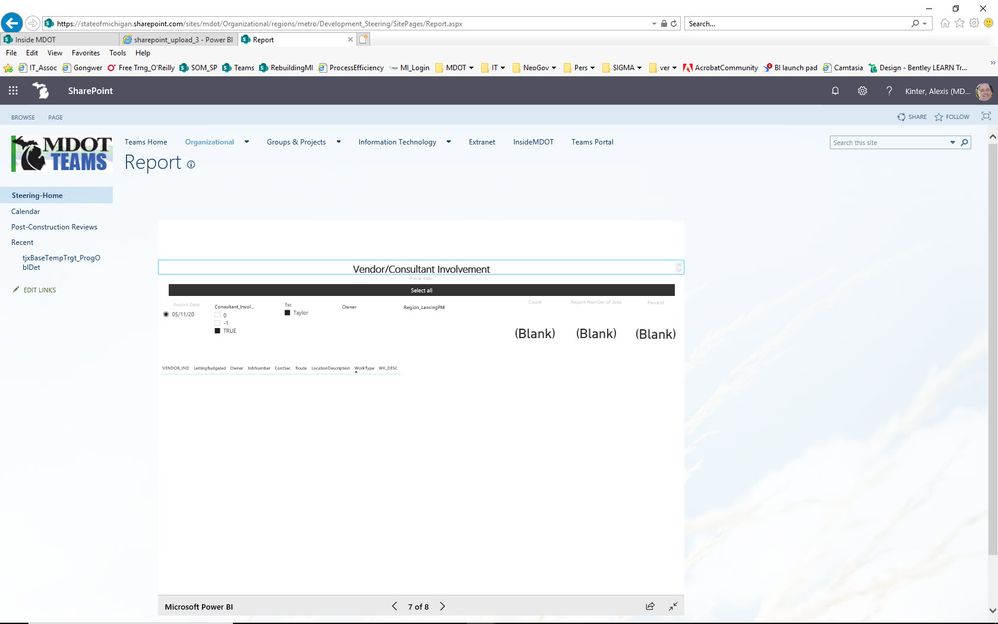
I am seeing things differently on a Sharepoint embed than on the service (see attached images) I republished, but didn't change the file. I've waited for propagation also. It's only on one report. Any ideas?

Thank you in advance


pbi_embed.jpgpbi_service.jpg

1 ACCEPTED SOLUTION
v-diye-msft
Community Support
Community Support

Hi @kintera 


 I  would suggest you use Edge/Google Chrome, they are the most compatible browsers for power bi.


Note the limitation:

  • Error: "An error occurred, please try logging out and back in and then revisiting this page. Correlation ID: undefined, http response status: 400, server error code 10001, message: Missing refresh token"

    If you receive this error, try one of the troubleshooting steps below.

    1. Sign out of SharePoint and sign back in. Be sure to close all browser windows before signing back in.

    2. If your user account requires multi-factor authentication (MFA), then sign in to SharePoint using your MFA device (phone app, smart card, etc.).

    3. Azure B2B Guest users accounts are not supported. Users see the Power BI logo that shows the part is loading, but it doesn't show the report.

  • Power BI does not support the same localized languages that SharePoint Online does. As a result, you may not see proper localization within the embedded report.

  • You may encounter issues if using Internet Explorer 10.

  • The Power BI web part is not available for national clouds.

  • The classic SharePoint Server is not supported with this web part.

  • URL filters are not supported with the SPO web part.


Community Support Team _ Dina Ye
If this post helps, then please consider Accept it as the solution to help the other members find it more
quickly.

View solution in original post

4 REPLIES 4
v-diye-msft
Community Support
Community Support

Hi @kintera 


 I  would suggest you use Edge/Google Chrome, they are the most compatible browsers for power bi.


Note the limitation:

  • Error: "An error occurred, please try logging out and back in and then revisiting this page. Correlation ID: undefined, http response status: 400, server error code 10001, message: Missing refresh token"

    If you receive this error, try one of the troubleshooting steps below.

    1. Sign out of SharePoint and sign back in. Be sure to close all browser windows before signing back in.

    2. If your user account requires multi-factor authentication (MFA), then sign in to SharePoint using your MFA device (phone app, smart card, etc.).

    3. Azure B2B Guest users accounts are not supported. Users see the Power BI logo that shows the part is loading, but it doesn't show the report.

  • Power BI does not support the same localized languages that SharePoint Online does. As a result, you may not see proper localization within the embedded report.

  • You may encounter issues if using Internet Explorer 10.

  • The Power BI web part is not available for national clouds.

  • The classic SharePoint Server is not supported with this web part.

  • URL filters are not supported with the SPO web part.


Community Support Team _ Dina Ye
If this post helps, then please consider Accept it as the solution to help the other members find it more
quickly.
Harimvp
New Member

Hi,

There is an issue with the dataset. is there any RLS implemented? Refresh you dataset once and see it is working in service and match the same in SharePoint.


Thanks

Hari

Hello, Hari. Thanks for the response.


>There is an issue with the dataset.


I don't understand how that could be true as it is correct on the Service and not Sharepoint.


>is there any RLS implemented?


row-level-security - No


>Refresh you dataset once and see it is working in service and match the same in SharePoint.


I've done this, and it's still incorrect. 

Thanks for your thoughts


Hi @kintera 


would you mind look through my post above?


Community Support Team _ Dina Ye
If this post helps, then please consider Accept it as the solution to help the other members find it more
quickly.

Helpful resources

Announcements
FabCon and SQLCon Barcelona 2026

FabCon & SQLCon – Barcelona 2026

Join us in Barcelona for FabCon and SQLCon, the Fabric, Power BI, SQL, and AI community event. Save €200 with code FABCMTY200.

60 days of Data Days Carousel

Data Days 2026

Join Data Days 2026: 60 days of free live/on-demand sessions, challenges, study groups, and certification opportunities.

Power BI DataViz World Championships carousel

Power BI DataViz World Championships - June 2026

A new Power BI DataViz World Championship is coming this June! Don't miss out on submitting your entry.