cancel
Showing results for 
Search instead for 
Did you mean: 

The Power BI Data Visualization World Championships is back! Get ahead of the game and start preparing now! Learn more

Reply
cra2y80y
New Member

Date's disappearing from chart when viewing over 6 months of daily data.

My company has a transactional dataset with a size of 266mb at the moment and grows daily.  The dataset is very grainular down to each timed transaction with data for product and pricing etc.

We have a report that we can visualise by Year / Month / Week / Day or Hour.


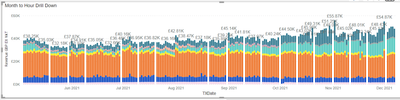
The issue is that when we do the report and have more than 6 months of data in the day or hour view random days start to go missing on the report view and it shows an empty space where the day should of be.  If you go up a level to week then all the data is shown.

Is there a resriction on how much data can be loaded into the report view as the issue get worse the bigger the date range.

I have added a copy of the view so you can see what I mean with the missing dates. 

cra2y80y_0-1638968790220.png

Any help would be helpful.


1 REPLY 1
lbendlin
Super User
Super User

Yes, you can have a maximum of x data points (varies by chart type) before charts start to group, as indicated by the big blue "i"  icon. Select fewer data points.

Helpful resources

Announcements
Power BI DataViz World Championships

Power BI Dataviz World Championships

The Power BI Data Visualization World Championships is back! Get ahead of the game and start preparing now!

December 2025 Power BI Update Carousel

Power BI Monthly Update - December 2025

Check out the December 2025 Power BI Holiday Recap!

FabCon Atlanta 2026 carousel

FabCon Atlanta 2026

Join us at FabCon Atlanta, March 16-20, for the ultimate Fabric, Power BI, AI and SQL community-led event. Save $200 with code FABCOMM.