cancel
Showing results for 
Search instead for 
Did you mean: 

Data Days is here! Join us now for 60+ days of learning, challenges, and connection. Learn more

Reply
AilleryO
Memorable Member
Memorable Member

Date Problem LocalDate PBI Service Desktop

Hi,

I am facing a strange display in PBI Service regarding a date-time.

I'm using a table to get the last refresh date with 2 columns, one in LocalTime and the other in UTC date.

Very simple table like this :


let
Source = #table(type table[LocalDate=datetime, UtcDate=datetime], {{DateTime.LocalNow(),DateTimeZone.UtcNow()}}),
    #"Type modifié" = Table.TransformColumnTypes(Source,{{"LocalDate", type datetimezone}, {"UtcDate", type datetimezone}}),
    #"Année insérée" = Table.AddColumn(#"Type modifié", "Année", each Date.Year([LocalDate]), Int64.Type),
    #"Colonnes permutées" = Table.ReorderColumns(#"Année insérée",{"LocalDate", "Année", "UtcDate"})
in
    #"Colonnes permutées"


On PBI Desktop everyhting works fine and the time and date are correct (in table and in visuals)

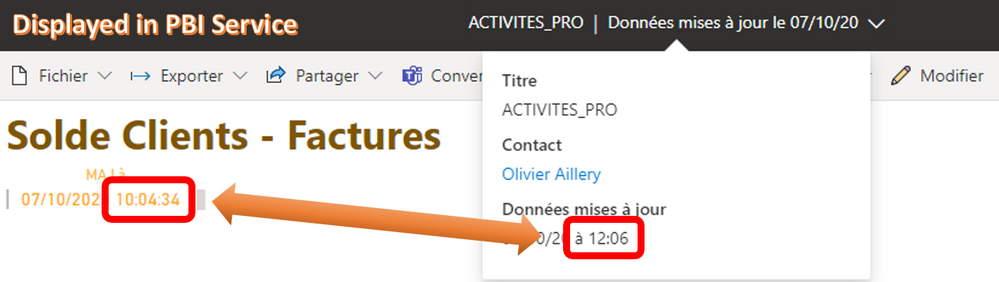
On PBI Service, if I look in the drop down menu (from title bar) I have the correct date and time displayed (see image below).

But on the field on my page I have a time 2 hours behind.

(I'm in France and my data are stored in Netherlands).

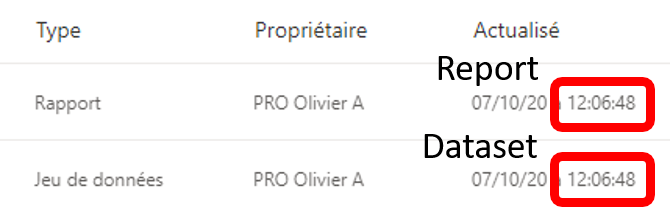
If i look at the update date-time in the list view for my dataset and my report, update date-time are correct (see image below).

So it works fine everywhere except on my report, 😞 and as a consequence it is not correct neither on my dashboard.
Pb_Dates_PBIService.pngPb_Dates_PBIService2.png


Does anyone have a clue ?


Thanks

Olivier

1 ACCEPTED SOLUTION

The Power BI service runs on UTC.

View solution in original post

3 REPLIES 3
lbendlin
Super User
Super User

Hi,


Thanks for your reply and suggested link.

My problem being I don't know what correction I should make since there is no Time Zone between Netherlands and France ?

I can make a query as suggested in the link to retrieve desired time zone... Ok but I love to understand things...


Obvioulsy I could make a 2 hours correction but without knowing where it comes from ?

So I am wondering where is that time coming from ? Greenland ?


Does anyone else have experienced something like that ?

The Power BI service runs on UTC.

Helpful resources

Announcements
Fabric Data Days is here Carousel

Fabric Data Days 2026

Don't miss out on Data Days, June 15 through August 7. Learn Fabric, Power BI, SQL, AI and more.

May Power BI Update Carousel

Power BI Monthly Update - May 2026

Check out the May 2026 Power BI update to learn about new features.

Power BI DataViz World Championships carousel

Power BI DataViz World Championships - June 2026

A new Power BI DataViz World Championship is coming this June! Don't miss out on submitting your entry.