cancel
Showing results for 
Search instead for 
Did you mean: 

Try your skills in the Power BI Dataviz World Championship! Round one ends June 26. Join now

Reply
Anonymous
Not applicable

Dataset settings

The Settings option for Datasets appears to have disappeared, I have a dataset with an expired username/password, but I've got no ability to Edit the dataset to correct it, even though I keep getting notified it's expired and can't refresh.


When I click on the dataset, the options are:

Rename

Remove

Schedule Refresh

Refresh Now

Analyze in Excel

Quick Insights


If you click "Schedule Refresh" you get to the Settings for the dataset and can edit it, but that's hardly intuitive. Why's the settings button missing?


2 REPLIES 2
v-haibl-msft
Microsoft Employee
Microsoft Employee

@Anonymous


Does above solution help? Please let me know if you still have question about it.
 
Best Regards,
Herbert

v-haibl-msft
Microsoft Employee
Microsoft Employee

@Anonymous


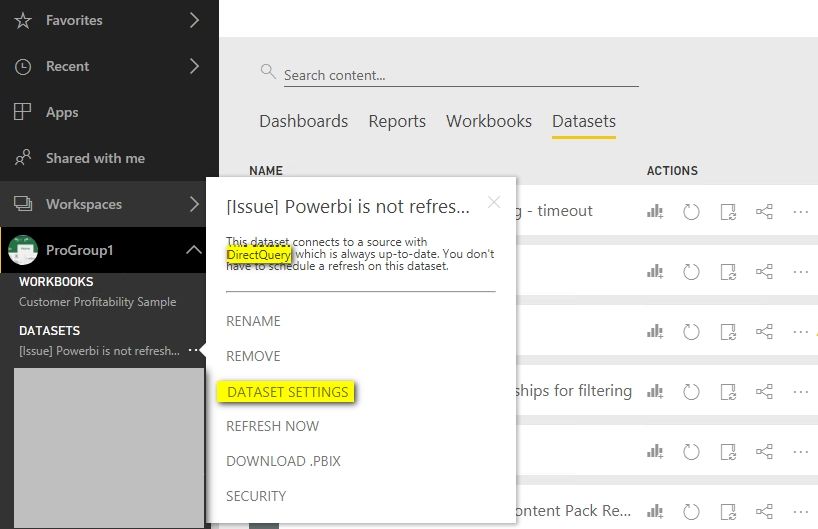
The DATASET SETTINGS option is only available for DirectQuery connection. However, you can see the Settings option in the New Navigation as following screenshot.


Dataset settings_1.jpg


Dataset settings_2.jpg


Best Regards,
Herbert

Helpful resources

Announcements
Fabric Data Days is here Carousel

Fabric Data Days 2026

Don't miss out on Data Days, June 15 through August 7. Learn Fabric, Power BI, SQL, AI and more.

Power BI DataViz World Championships carousel

Power BI DataViz World Championships - June 2026

A new Power BI DataViz World Championship is coming this June! Don't miss out on submitting your entry.