This time we’re going bigger than ever. Fabric, Power BI, SQL, AI and more. We're covering it all. You won't want to miss it.
Learn moreJoin the FabCon + SQLCon recap series. Up next: Power BI, Real-Time Intelligence, IQ and AI, and Data Factory take center stage. All sessions are available on-demand after the live show. Register now
The Settings option for Datasets appears to have disappeared, I have a dataset with an expired username/password, but I've got no ability to Edit the dataset to correct it, even though I keep getting notified it's expired and can't refresh.
When I click on the dataset, the options are:
Rename
Remove
Schedule Refresh
Refresh Now
Analyze in Excel
Quick Insights
If you click "Schedule Refresh" you get to the Settings for the dataset and can edit it, but that's hardly intuitive. Why's the settings button missing?
@Anonymous
Does above solution help? Please let me know if you still have question about it.
Best Regards,
Herbert
@Anonymous
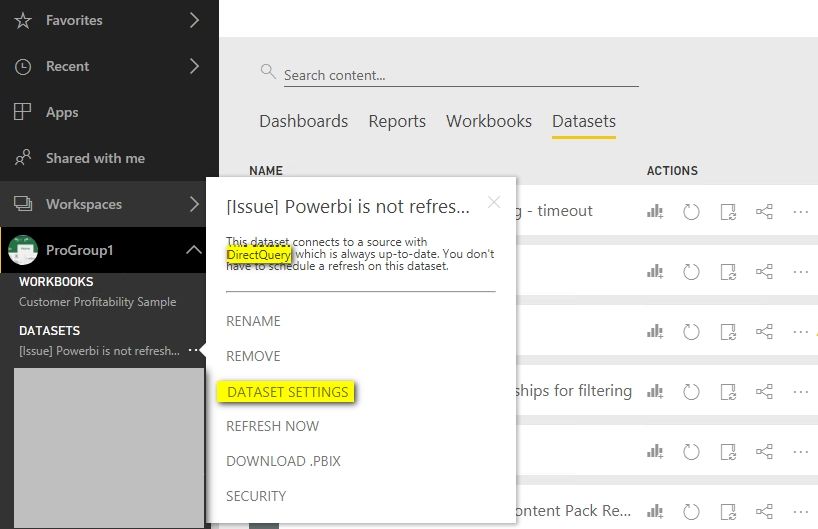
The DATASET SETTINGS option is only available for DirectQuery connection. However, you can see the Settings option in the New Navigation as following screenshot.
Best Regards,
Herbert
Check out the April 2026 Power BI update to learn about new features.
If you have recently started exploring Fabric, we'd love to hear how it's going. Your feedback can help with product improvements.
A new Power BI DataViz World Championship is coming this June! Don't miss out on submitting your entry.
| User | Count |
|---|---|
| 11 | |
| 10 | |
| 9 | |
| 8 | |
| 8 |
| User | Count |
|---|---|
| 49 | |
| 34 | |
| 27 | |
| 21 | |
| 20 |