
Join us at FabCon Atlanta from March 16 - 20, 2026, for the ultimate Fabric, Power BI, AI and SQL community-led event. Save $200 with code FABCOMM.
Register now!The Power BI Data Visualization World Championships is back! Get ahead of the game and start preparing now! Learn more
Hello Team,
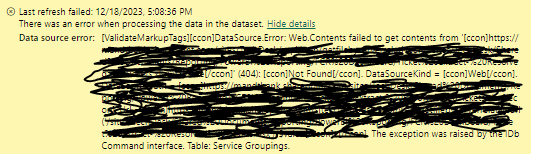
We have connected excel file which is available in sharepoint online list in Power BI desktop and published the report into the service. For set up automatic refresh we have updated credential under data source settings and refreshed dataset. From past four days the refresh is failing and getting below error. Can anyone please help me on this to troubleshoot the issue.
Thanks in advance!
Hi @Anonymous
You didn't chose the right connector in Desktop
if you want to use Web connector then you need to look for the path of the file in Sharepoint, Copy/Paste in Power BI Desktop.
Or you chose the Sharepoint List/Folder connector in Power BI desktop
Regards
Amine Jerbi
If I answered your question, please mark this thread as accepted
and you can follow me on
My Website, LinkedIn and Facebook
The Power BI Data Visualization World Championships is back! Get ahead of the game and start preparing now!
| User | Count |
|---|---|
| 56 | |
| 55 | |
| 32 | |
| 18 | |
| 14 |