
This time we’re going bigger than ever. Fabric, Power BI, SQL, AI and more. We're covering it all. You won't want to miss it.
Learn moreDid you hear? There's a new SQL AI Developer certification (DP-800). Start preparing now and be one of the first to get certified. Register now
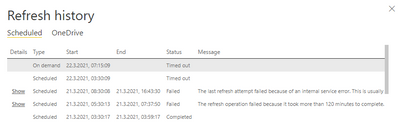
Since this Sunday we have an issue with Datasets that Timeout and after that its impossible to modify them. Usually they run in about 30 min, but after the first error on Sunday we can't do anything. If I refresh the data in Power BI Desktop everything works fine but even if I try to publish the locally refreshed file to the workspace it just takes forever and after a while it seems to be stuck.
Even the Scheduler seems to be frozen since it sais, that the next scheduled refresh will be on 03:30, which is about 8 hours ago.
Anyone got any ideas on this one?
Solved! Go to Solution.
In case anyone ever gets the same error: I've Updated the gateway and deactivated the Scheduler. Then I waited until all jobs get the state 'Failed' and the I deployed it again and since then it works again.
Check out the April 2026 Power BI update to learn about new features.
Sign up to receive a private message when registration opens and key events begin.
If you have recently started exploring Fabric, we'd love to hear how it's going. Your feedback can help with product improvements.
| User | Count |
|---|---|
| 11 | |
| 9 | |
| 8 | |
| 8 | |
| 7 |
| User | Count |
|---|---|
| 50 | |
| 27 | |
| 23 | |
| 23 | |
| 22 |