This is best Fabric, Power BI, SQL and AI community event. How do we know? The last event sold out! Save €200 with code FABCMTY200.
Register nowA new Data Days event is coming soon! This time we’re going bigger than ever. Fabric, Power BI, SQL, AI and more. Don't miss out.
All,
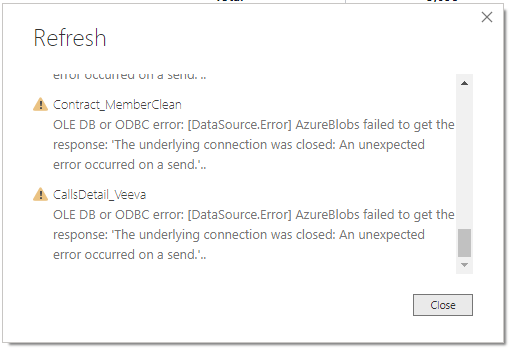
I have not made any changes to Dataflows, Datasets, connections, Data Gateway, or any other change. This morning I received an error for all dataflows while refreshing in the Power BI Desktop (image below). The Dataflows and Datasets are refreshing in Web Service, but I'm not able to either refresh in Desktop or add new Dataflows to Desktop.
Any thoughts?
Solved! Go to Solution.
Hi @mgreez ,
I have tested on my side, and it works well. Please try it again.
If the issue is still there, please check:
And for new dataflows, you need to refresh first in Power BI Service and then you can connect to them in Power BI Desktop.
Best Regards,
Icey
If this post helps, then please consider Accept it as the solution to help the other members find it more quickly.
Hi @mgreez ,
I have tested on my side, and it works well. Please try it again.
If the issue is still there, please check:
And for new dataflows, you need to refresh first in Power BI Service and then you can connect to them in Power BI Desktop.
Best Regards,
Icey
If this post helps, then please consider Accept it as the solution to help the other members find it more quickly.
@Icey Thank you for your reply! Whatever occurred, it is now working as expected. I'm offsite working through the VPN, so I'll check again when I am back in the office to see if it's related to the onsite firewalls, etc.
Thanks!
Mike
Sign up to receive a private message when registration opens and key events begin.
If you have recently started exploring Fabric, we'd love to hear how it's going. Your feedback can help with product improvements.
| User | Count |
|---|---|
| 11 | |
| 10 | |
| 7 | |
| 7 | |
| 7 |
| User | Count |
|---|---|
| 28 | |
| 26 | |
| 22 | |
| 21 | |
| 18 |