cancel
Showing results for 
Search instead for 
Did you mean: 

Join the FabCon + SQLCon recap series. Up next: Power BI, Real-Time Intelligence, IQ and AI, and Data Factory take center stage. All sessions are available on-demand after the live show. Register now

Reply
rdnguyen
Helper V
Helper V

Dataflow online column profiling

Hi All,


When you cleanse data in Dataflow power query, how do you profile the columns? I didn't see the option for showin columns profiles in Dataflow Power Query Editor online.


The reason I asked because if performing profiling to review each columns' data quality, it's experiencing pro-longed delay to load as the table I brought into Dataflow is more than 1M records.


Thanks.

Rich

1 ACCEPTED SOLUTION
edhans
Community Champion
Community Champion

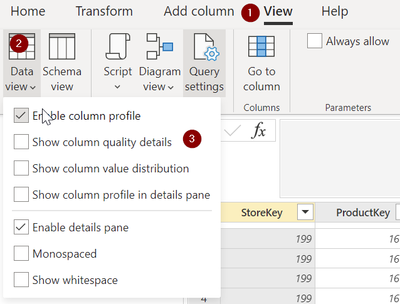
  1. Select View menu
  2. Select the dropdown in the Data View icon
  3. Turn on "Enable column profle" then check what you want to use. 

    edhans_0-1646933991489.png


Did I answer your question? Mark my post as a solution!
Did my answers help arrive at a solution? Give it a kudos by clicking the Thumbs Up!

DAX is for Analysis. Power Query is for Data Modeling


Proud to be a Super User!

MCSA: BI Reporting

View solution in original post

3 REPLIES 3
Bujor
Frequent Visitor

I don't understand why don't they make this feature more visible.

rdnguyen
Helper V
Helper V

Oh great! Thanks alot for your help.

edhans
Community Champion
Community Champion

  1. Select View menu
  2. Select the dropdown in the Data View icon
  3. Turn on "Enable column profle" then check what you want to use. 

    edhans_0-1646933991489.png


Did I answer your question? Mark my post as a solution!
Did my answers help arrive at a solution? Give it a kudos by clicking the Thumbs Up!

DAX is for Analysis. Power Query is for Data Modeling


Proud to be a Super User!

MCSA: BI Reporting

Helpful resources

Announcements
April Power BI Update Carousel

Power BI Monthly Update - April 2026

Check out the April 2026 Power BI update to learn about new features.

New to Fabric survey Carousel

New to Fabric Survey

If you have recently started exploring Fabric, we'd love to hear how it's going. Your feedback can help with product improvements.

Power BI DataViz World Championships carousel

Power BI DataViz World Championships - June 2026

A new Power BI DataViz World Championship is coming this June! Don't miss out on submitting your entry.

FabCon and SQLCon Highlights Carousel

FabCon &SQLCon Highlights

Experience the highlights from FabCon & SQLCon, available live and on-demand starting April 14th.