
cancel
Showing results for 
Search instead for 
Did you mean: 

Learn from the best! Meet the four finalists headed to the FINALS of the Power BI Dataviz World Championships! Register now

Reply
mpaixao
Advocate I
Advocate I

Dataflow and Azure Analysis Service

Hello all,


I'm facing one issue to connect the Dataflow (or Datamart) to Azure Analysis Service. Using the step-by-step configuration (also known as wizard) it never work. If I create a blank query and then copy-paste from Power Query desktop the full query it's also not able to render and process single steps but saving it SOMETIMES it works.


I'm quite sure it's some miss configuration on my company side (it's under migration right now), but could also be a bug on Microsoft side. 


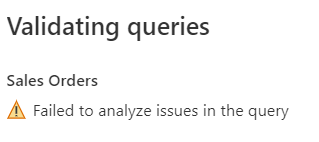
Anyone have a clue how to solve it? Find below the error, none additional details:


mpaixao_0-1669904643124.png


mpaixao_1-1669904656428.png


#dataflow #azureanalysisservice #azure


Best regards.


2 REPLIES 2
Anonymous
Not applicable

Hi @mpaixao ,


This seems to be a random error.

You may contact the support.

How to create a support ticket in Power BI - Microsoft Power BI Community


I found that all the time that I need to edit it I have to select the Options-Gateway again. It's loosing once the dataflow is saved.

Helpful resources

Announcements
Join our Fabric User Panel

Join our Fabric User Panel

Share feedback directly with Fabric product managers, participate in targeted research studies and influence the Fabric roadmap.

March Power BI Update Carousel

Power BI Community Update - March 2026

Check out the March 2026 Power BI update to learn about new features.

Top Solution Authors