cancel
Showing results for 
Search instead for 
Did you mean: 

The Power BI Data Visualization World Championships is back! Get ahead of the game and start preparing now! Learn more

Reply
madrid
Helper I
Helper I

Dataflow: What you see is not what you get !?

Hi there,


I have a problem with Dataflow that Transformation steps is being evaluated differently between "Power Query Editor" mode showing in Editing Dataflow vs. result come out from PowerBI services.


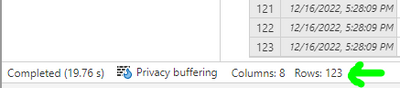
  • In Power Query Editor mode of the dataflow, at final transformation step of the table, I got 123 rows:
madrid_0-1671255221337.png

(I have also tried to copy all steps and evaluate in PowerBi Desktop, I got 123 rows too)


  • Then I save the dataflow, then refresh it, then open refresh report, it says only 120 row Processed:

madrid_1-1671255561541.png


  • Then I open PowerBI desktop, create new project and connect to that dataflow table, what I got is only 120 row, too:
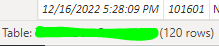
madrid_2-1671255950187.png (in Data tab)

madrid_4-1671256125189.png(and in Power Query Editor mode)


There was nothing special on that 3 rows, they are with normal data like other rows. I also making sure there is no simple mistake here (no filtering, no cross reference).

Anyone has experienced this ? What else can I try to resolve this issue ?


Many thanks in advance!

7 REPLIES 7
lbendlin
Super User
Super User

Any of your data depending on timezones?

Hi Ibendlin, No, data source is a static excel files in SharePoint.

let me ask differently - any datetime fields ?

Yes, there is a date time column in the Excel file (as data column, not a calculated one). Any hints?

Thanks!

- the power bi service runs on UTC

- you are looking at the data based on the browser's user's timezone.

- you have a relative date filter somewhere

-> some data is cut off.

Thanks for suggestions, but I'm very sure it's not the case.

As I mentioned earlier there is no filter being applied. The date/time column is actually showing when the file uploaded to SharePoint, so actually only 2 different time/date values for those 123 rows.

I don't remember read somewhere saying interpretation engines are difference in Editor mode vs in Service background mode ? Could this be the case ?

That could be the case if you were not using a dataflow. For those I would have to assume that the mashup engine matches the ones in the service. 

Helpful resources

Announcements
Power BI DataViz World Championships

Power BI Dataviz World Championships

The Power BI Data Visualization World Championships is back! Get ahead of the game and start preparing now!

December 2025 Power BI Update Carousel

Power BI Monthly Update - December 2025

Check out the December 2025 Power BI Holiday Recap!

FabCon Atlanta 2026 carousel

FabCon Atlanta 2026

Join us at FabCon Atlanta, March 16-20, for the ultimate Fabric, Power BI, AI and SQL community-led event. Save $200 with code FABCOMM.
