Get certified for free when you join Fabric Data Days 2026 and dive into Fabric, Power BI, SQL, AI, and other essential data skills.
Join nowJuly 7 - July 17 | Round 2 of the Power BI Dataviz World Championships. Don't miss your chance! Learn more
Error: Container exited unexpectedly with code 0x0000DEAD. PID: 10280... RootActivityId = 06c4cfda-a3b2-4a8a-a47f-368097ad3037.Param1 = Container exited unexpectedly with code 0x0000DEAD. PID: 10280. Request ID: ea0283d9-2d2b-ea4f-09e3-1bbd87ba49eb. Built dataflow in PBI service with Salesforce Object. Dataflow refreshed successfully after initial save, but after adding incremental refresh it has given the error above.
Hi,
Since the dataflow refreshed successfully before incremental refresh was enabled, I would first check the incremental refresh setup and capacity, not Salesforce credentials.
A few things to verify:
The workspace is on Premium capacity, since incremental refresh for Power BI dataflows requires it.
The incremental refresh policy uses a proper DateTime column.
The date filter is applied as early as possible.
The Salesforce query is not pulling a very wide object before filtering.
Heavy merges, expands, or transformations are reduced before enabling incremental refresh.
Refresh history shows whether the failure is tied to memory, capacity, or a specific table.
The 0x0000DEAD container error can point to a dataflow runtime or resource issue, so simplifying the Salesforce extraction is a good first test.
If you want to prepare a narrower Salesforce source before Power BI, Power BI Connector for Salesforce by Metrica Software can help: https://appexchange.salesforce.com/appxListingDetail?listingId=31526f0e-abd8-4cb5-bd1a-3bd56b5c0577
It lets you select Salesforce objects and fields, apply filters, preview the output, and use SOQL mode where it fits the source design.
This will not fix a Power BI capacity or dataflow runtime issue by itself, but it can help reduce the amount of Salesforce data and transformation work the dataflow has to process.
Docs and support:
https://metricasoftware.com/docs/salesforce/
https://metricasoftware.com/docs/salesforce/contact-support/
Cheers,
Metrica Team
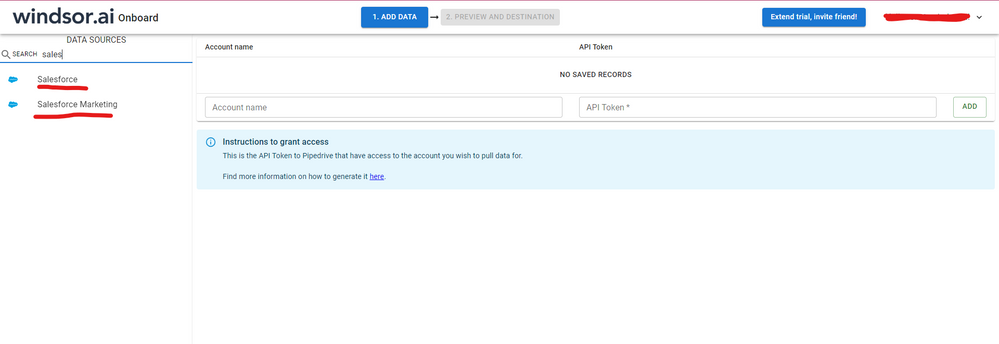
Hi, were you able to find a solution? I think in this case there's no need to use a dataflow. As a workaround, maybe you can try to test your connection with a 3rd party connector. I've tried windsor.ai, supermetrics and funnel.io. I stayed with windsor because it is much cheaper so just to let you know other options. In case you wonder, to make the connection first search for the Salesforce connector in the data sources list:
After that, just grant access to your Salesforce account using your credentials, then on preview and destination page you will see a preview of your Salesforce fields:
There just select the fields you need. It is also compatible with custom fields and custom objects, so you'll be able to export them through windsor. Finally, just select PBI as your data destination and finally just copy and paste the url on PBI --> Get Data --> Web --> Paste the url.
@Anonymous
Hope you are having the premium capacity.
I heard that there was few issues going on, Please refer the support page for known issues.
If this post helps, then please consider Accept it as the solution to help the other members find it more
If this post was helpful may I ask you to mark it as solution and give it some kudos?
Hi @Anonymous ,
You could create a support ticket to get a urgent help.
Best Regards,
Xue Ding
If this post helps, then please consider Accept it as the solution to help the other members find it more quickly.
Join us in Barcelona for FabCon and SQLCon, the Fabric, Power BI, SQL, and AI community event. Save €200 with code FABCMTY200.
Join Data Days 2026: 60 days of free live/on-demand sessions, challenges, study groups, and certification opportunities.
| User | Count |
|---|---|
| 25 | |
| 10 | |
| 10 | |
| 6 | |
| 5 |