cancel
Showing results for 
Search instead for 
Did you mean: 

Get Fabric Certified for FREE during Fabric Data Days. Don't miss your chance! Request now

Reply
TMO_KY
Helper II
Helper II

Dataflow Failed refresh: The exception was raised by the IDataReader interface.

Hey Y'all, I know this error has been mentioned several times but none of the answers are specific to my scenario so any help would be appreciated.


Here's the error: Data source errorDataflowUnauthorizedError. The exception was raised by the IDataReader interface. Please review the error message and provider documentation for further information and corrective action. 


Now the background of what I have going on, I have a bunch of dataflows that pull from Sharepoint (thousands of excel files) and Salesforce.  I did this to speed up the refresh process since there's a ton of data.  The dataflows all refresh fine with absolutely no issues, see screenshot:
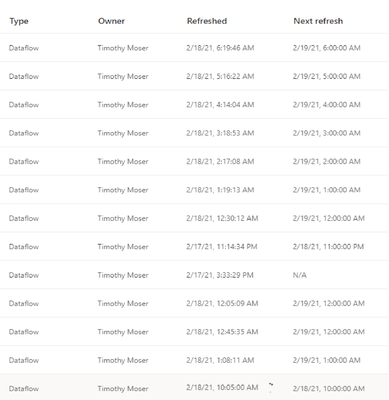
 

All dataflows refresh fineAll dataflows refresh fine


Now when I build my PBIX file in desktop, I link to the dataflows and it refreshes perfect with no errors or issues and MUCH quicker since I'm using dataflows,  But as soon as I publish the PBIX file to Service and set automatic refresh is when I get the failure: Data source errorDataflowUnauthorizedError.


I've checked the credentials in Service and it says everything is fine:
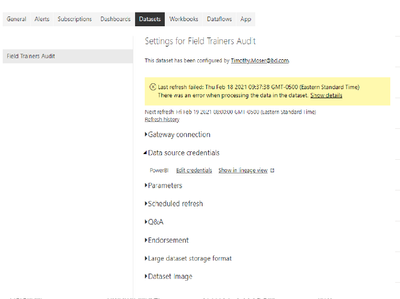
Flow Credentials.pngFlow Credentials 2.png


Now I've tried changing Privacy level to Organization and None and it still seems to fail.  I do not have any merged queries, I have one using the Append but no Merge (fuzzy), I read that was one person's issue.   Any help would be greatly appreciated.  I don't want to go back to the old way of pulling the data because I was getting the Sharepoint Timeout errors and Dataflows make it super effecient in the desktop to make tweaks and showcase to upper management.

1 ACCEPTED SOLUTION

@v-robertq-msft   Thanks for your reponse.  It ended up being the different workspace capacity levels.  Dumb in my opinion but the dataflows are housed on a Premium Capacity (trial) and the reports/dashboards are housed on a normal workspace capacity.  You would think they would still "talk" to eachother. 

View solution in original post

3 REPLIES 3
ReportMaster
Post Patron
Post Patron

Hi @TMO_KY I think in this case even a dataflow is not needed for a SF data source. As a workaround, maybe you can try with an external connector. I've tried windsor.ai, supermetrics and funnel.io. I stayed with windsor because it is much cheaper so just to let you know other options.

v-robertq-msft
Community Support
Community Support

Hi, @TMO_KY 

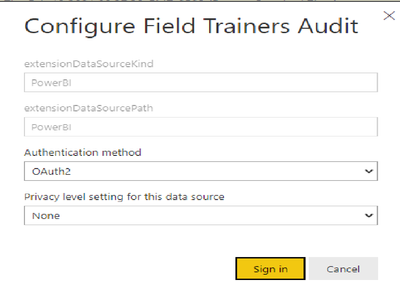
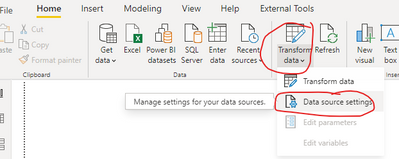
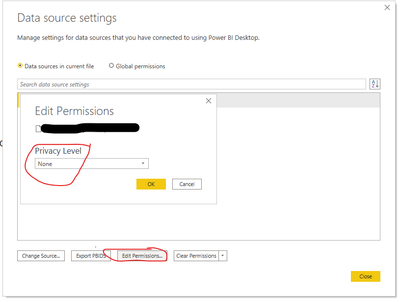
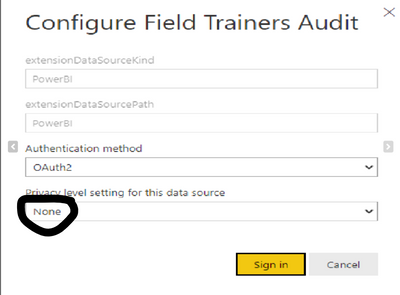
I think you can check and guarantee the Privacy level of the dataset in your Service to keep the same as the Privacy level in the desktop, which may cause the scheduled refresh failure, like this:

v-robertq-msft_0-1613962517374.png

v-robertq-msft_1-1613962517379.png

v-robertq-msft_2-1613962517389.png


Understand Power BI Desktop privacy levels

Privacy Levels for Cloud Data Sources


Best Regards,

Community Support Team _Robert Qin

If this post helps, then please consider Accept it as the solution to help the other members find it more quickly.

@v-robertq-msft   Thanks for your reponse.  It ended up being the different workspace capacity levels.  Dumb in my opinion but the dataflows are housed on a Premium Capacity (trial) and the reports/dashboards are housed on a normal workspace capacity.  You would think they would still "talk" to eachother. 

Helpful resources

Announcements
November Power BI Update Carousel

Power BI Monthly Update - November 2025

Check out the November 2025 Power BI update to learn about new features.

Fabric Data Days Carousel

Fabric Data Days

Advance your Data & AI career with 50 days of live learning, contests, hands-on challenges, study groups & certifications and more!

FabCon Atlanta 2026 carousel

FabCon Atlanta 2026

Join us at FabCon Atlanta, March 16-20, for the ultimate Fabric, Power BI, AI and SQL community-led event. Save $200 with code FABCOMM.

Top Solution Authors