cancel
Showing results for 
Search instead for 
Did you mean: 

July 7 - July 17 | Round 2 of the Power BI Dataviz World Championships. Don't miss your chance! Learn more

Reply
malleshG
Frequent Visitor

DataSource.Error: AnalysisServices: The remote server returned an error: (400) Bad Request.

HI Team,


I have connected to power bi dataset with analysis service mode in power bi desktop(import mode) and the report was working fine earlier and refresh happing without error. where from few days i am getting refresh error which are published with my credentials. and i am not able to connect to any power BI dataset using analysis service(import mode). where i have Pro license and reports are published in premium work space.

1 ACCEPTED SOLUTION

400 usually means a malformed DAX query. But in your case it sounds more like expired credentials. 

View solution in original post

6 REPLIES 6
Icey
Community Support
Community Support

Hi @malleshG ,


I have connected to power bi dataset with analysis service mode in power bi desktop(import mode) and the report was working fine earlier and refresh happing without error


Have you changed any settings recently? For example, settings in Admin Portal, or settings of your environment, or switch from Premium Gen1 to Premium Gen2, etc..


and i am not able to connect to any power BI dataset using analysis service(import mode). where i have Pro license and reports are published in premium work space.


What's your Premium SKU? 

Are you able to connect to Power BI Dataset in Shared Capacity (pro workspace)? 

Only you encountered such an issue in your organization?
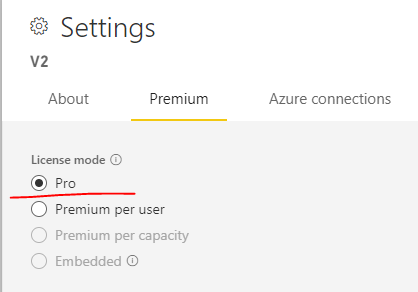
Icey_0-1639638018531.png


In addition, what's your Power BI Desktop version and Power BI Service version?


Best Regards,

Icey


If this post helps, then please consider Accept it as the solution to help the other members find it more quickly.

lbendlin
Super User
Super User

Are you running a custom DAX query against the dataset?  

No Not yet, checking with other users and internal admin team for access issues

Yes, I am using dax query. earlier it was working fine, now am getting the error while validating my credentials, mean now i am not able to connect any power BI data set in anlysis service mode

400 usually means a malformed DAX query. But in your case it sounds more like expired credentials. 

Power BI admin was disabled the analyze in excel option, now its enabled and i am able to connect and refresh the data set

Helpful resources

Announcements
FabCon and SQLCon Barcelona 2026

FabCon & SQLCon – Barcelona 2026

Join us in Barcelona for FabCon and SQLCon, the Fabric, Power BI, SQL, and AI community event. Save €200 with code FABCMTY200.

60 days of Data Days Carousel

Data Days 2026

Join Fabric Data Days 2026: 60 days of free live/on-demand sessions, challenges, study groups, and certification opportunities.

Power BI DataViz World Championships carousel

Power BI DataViz World Championships - June 2026

A new Power BI DataViz World Championship is coming this June! Don't miss out on submitting your entry.