Join us at FabCon Atlanta from March 16 - 20, 2026, for the ultimate Fabric, Power BI, AI and SQL community-led event. Save $200 with code FABCOMM.
Register now!Vote for your favorite vizzies from the Power BI Dataviz World Championship submissions. Vote now!
Hello Everyone
I'm building some Dataflows on one Workspace, as read on Microsoft documentation Power Bi Pro includes10Gb/user of Storage for Dataflows. Is there any place to check the space used and the available one?
Regards
Hi @Anonymous ,
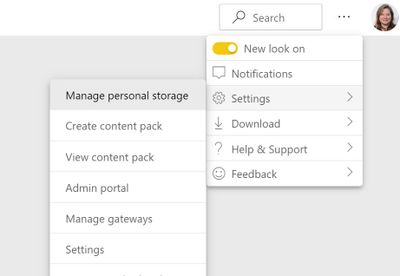
you can check it here:
"Manage personal storage" 🙂
Also under Admin Portal - If you are a Capacity Admin or Power BI Admin you can check there capacity settings.
Best,
Kathrin
If this post has helped you, please give it a thumbs up!
Did I answer your question? Mark my post as a solution!
Thanks @KBO
I already tried that but only Datasets are listed on that screen, find some Screenshots attached.
Any guidance?
Hi , @Anonymous
The storage locations of dataset and dataflow are different.
Data is stored as entities in the Common Data Model in Azure Data Lake Storage Gen2.
So it is difficult for you to check the dataflow occupancy on the service "Manage personal storage"
For more details ,please refer to this document.
Best Regards,
Community Support Team _ Eason
If this post helps, then please consider Accept it as the solution to help the other members find it more quickly.
Vote for your favorite vizzies from the Power BI World Championship submissions!
If you love stickers, then you will definitely want to check out our Community Sticker Challenge!
Check out the January 2026 Power BI update to learn about new features.
| User | Count |
|---|---|
| 18 | |
| 10 | |
| 9 | |
| 8 | |
| 7 |
| User | Count |
|---|---|
| 46 | |
| 40 | |
| 38 | |
| 25 | |
| 24 |