- Power BI forums
- Get Help with Power BI
- Desktop
- Service
- Report Server
- Power Query
- Mobile Apps
- Developer
- DAX Commands and Tips
- Custom Visuals Development Discussion
- Health and Life Sciences
- Power BI Spanish forums
- Translated Spanish Desktop
- Training and Consulting
- Instructor Led Training
- Dashboard in a Day for Women, by Women
- Galleries
- Data Stories Gallery
- Themes Gallery
- Contests Gallery
- QuickViz Gallery
- Quick Measures Gallery
- Visual Calculations Gallery
- Notebook Gallery
- Translytical Task Flow Gallery
- TMDL Gallery
- R Script Showcase
- Webinars and Video Gallery
- Ideas
- Custom Visuals Ideas (read-only)
- Issues
- Issues
- Events
- Upcoming Events
Learn from the best! Meet the four finalists headed to the FINALS of the Power BI Dataviz World Championships! Register now
- Power BI forums
- Forums
- Get Help with Power BI
- Service
- DataFlow Error || Transport Connection || On Premi...
- Subscribe to RSS Feed
- Mark Topic as New
- Mark Topic as Read
- Float this Topic for Current User
- Bookmark
- Subscribe
- Printer Friendly Page

- Mark as New
- Bookmark
- Subscribe
- Mute
- Subscribe to RSS Feed
- Permalink
- Report Inappropriate Content
DataFlow Error || Transport Connection || On Premise SQL Server
Hi All,
I am trying to create a dataflow which is connected to my onpremise SQL server and than using AI insights function in PowerBI Services (premium workspace- power query) to extract key phrases & sentiment score Insights.
It works well till this step.
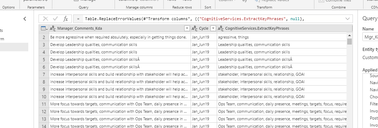
Now when i do manual refresh on this dataflow i get below error and i don't get any data in PowerBI desktop when we connect to this data flow.
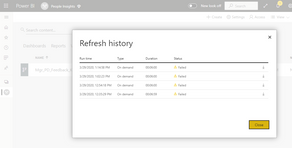
On clicking on error message its says
Error: Encountered user gateway exception: '<pi>An error happened while reading data from the provider: 'Unable to read data from the transport connection: The connection was closed.'</pi>'.. RootActivityId = 29c93b8d-a349-4e35-a0ea-c84681e2d05b.Param1 = <pi>An error happened while reading data from the provider: 'Unable to read data from the transport connection: The connection was closed.'</pi> Request ID: e55cdd63-cdf3-98e1-5121-4db89565a28b.
Can anyone guide me on how to resolve this issue?
Solved! Go to Solution.


- Mark as New
- Bookmark
- Subscribe
- Mute
- Subscribe to RSS Feed
- Permalink
- Report Inappropriate Content
Hi @Anonymous ,
Do you check if the gateway is available? Do you add all data sources into gateway? And do you try change the privacy level?

Reference:
Xue Ding
If this post helps, then please consider Accept it as the solution to help the other members find it more quickly.
- Mark as New
- Bookmark
- Subscribe
- Mute
- Subscribe to RSS Feed
- Permalink
- Report Inappropriate Content
Hi @Anonymous ,
Could you tell me if your problem has been solved? If it is, kindly mark the helpful answer as a solution if you feel that makes sense. Welcome to share your own solution. More people will benefit from the thread.
Best Regards,
Xue Ding
If this post helps, then please consider Accept it as the solution to help the other members find it more quickly.
Xue Ding
If this post helps, then please consider Accept it as the solution to help the other members find it more quickly.
- Mark as New
- Bookmark
- Subscribe
- Mute
- Subscribe to RSS Feed
- Permalink
- Report Inappropriate Content
Hi @Anonymous ,
Do you check if the gateway is available? Do you add all data sources into gateway? And do you try change the privacy level?
Reference:
Xue Ding
If this post helps, then please consider Accept it as the solution to help the other members find it more quickly.
- Mark as New
- Bookmark
- Subscribe
- Mute
- Subscribe to RSS Feed
- Permalink
- Report Inappropriate Content
Thanks! Your suggestions helped in resolving the issue.
- Mark as New
- Bookmark
- Subscribe
- Mute
- Subscribe to RSS Feed
- Permalink
- Report Inappropriate Content
Glad it works for you.😊
Best Regards,
Xue Ding
Xue Ding
If this post helps, then please consider Accept it as the solution to help the other members find it more quickly.
- Mark as New
- Bookmark
- Subscribe
- Mute
- Subscribe to RSS Feed
- Permalink
- Report Inappropriate Content
Hi @Anonymous ,
Could you tell me if your problem has been solved? If it is, kindly mark the helpful answer as a solution if you feel that makes sense. Welcome to share your own solution. More people will benefit from the thread.
Best Regards,
Xue Ding
If this post helps, then please consider Accept it as the solution to help the other members find it more quickly.
Xue Ding
If this post helps, then please consider Accept it as the solution to help the other members find it more quickly.
Helpful resources

Join our Fabric User Panel
Share feedback directly with Fabric product managers, participate in targeted research studies and influence the Fabric roadmap.

Power BI Monthly Update - February 2026
Check out the February 2026 Power BI update to learn about new features.

| User | Count |
|---|---|
| 26 | |
| 21 | |
| 11 | |
| 10 | |
| 9 |


