Don't miss your chance to take the Fabric Data Engineer (DP-600) exam for FREE! Find out how by attending the DP-600 session on April 23rd (pacific time), live or on-demand.
Learn moreNext up in the FabCon + SQLCon recap series: The roadmap for Microsoft SQL and Maximizing Developer experiences in Fabric. All sessions are available on-demand after the live show. Register now
Hi All,
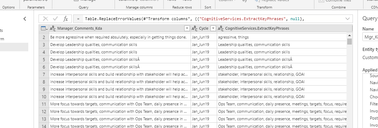
I am trying to create a dataflow which is connected to my onpremise SQL server and than using AI insights function in PowerBI Services (premium workspace- power query) to extract key phrases & sentiment score Insights.
It works well till this step.
Power Query
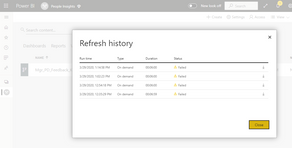
Now when i do manual refresh on this dataflow i get below error and i don't get any data in PowerBI desktop when we connect to this data flow.
Refresh Error
On clicking on error message its says
Error: Encountered user gateway exception: '<pi>An error happened while reading data from the provider: 'Unable to read data from the transport connection: The connection was closed.'</pi>'.. RootActivityId = 29c93b8d-a349-4e35-a0ea-c84681e2d05b.Param1 = <pi>An error happened while reading data from the provider: 'Unable to read data from the transport connection: The connection was closed.'</pi> Request ID: e55cdd63-cdf3-98e1-5121-4db89565a28b.
Can anyone guide me on how to resolve this issue?
Solved! Go to Solution.
Hi @Anonymous ,
Do you check if the gateway is available? Do you add all data sources into gateway? And do you try change the privacy level?
Reference:
Hi @Anonymous ,
Could you tell me if your problem has been solved? If it is, kindly mark the helpful answer as a solution if you feel that makes sense. Welcome to share your own solution. More people will benefit from the thread.
Best Regards,
Xue Ding
If this post helps, then please consider Accept it as the solution to help the other members find it more quickly.
Hi @Anonymous ,
Do you check if the gateway is available? Do you add all data sources into gateway? And do you try change the privacy level?
Reference:
Thanks! Your suggestions helped in resolving the issue.
Glad it works for you.😊
Best Regards,
Xue Ding
Hi @Anonymous ,
Could you tell me if your problem has been solved? If it is, kindly mark the helpful answer as a solution if you feel that makes sense. Welcome to share your own solution. More people will benefit from the thread.
Best Regards,
Xue Ding
If this post helps, then please consider Accept it as the solution to help the other members find it more quickly.
If you have recently started exploring Fabric, we'd love to hear how it's going. Your feedback can help with product improvements.
A new Power BI DataViz World Championship is coming this June! Don't miss out on submitting your entry.
Share feedback directly with Fabric product managers, participate in targeted research studies and influence the Fabric roadmap.
| User | Count |
|---|---|
| 30 | |
| 29 | |
| 20 | |
| 16 | |
| 16 |