This time we’re going bigger than ever. Fabric, Power BI, SQL, AI and more. We're covering it all. You won't want to miss it.
Learn moreLevel up your Power BI skills this month - build one visual each week and tell better stories with data! Get started
Hello,
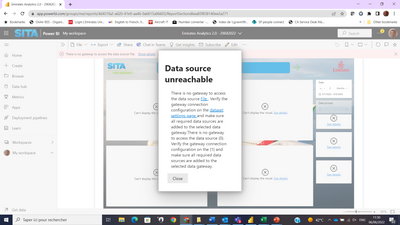
I am having this issue when publishing my reprot:
According to our Analytics team, there is no Gateway to be set here.
My pbix file has:
- Additioanl Measures
- Imported table (excel)
Reprots w/o addtional measures and imported tables works w/o issues.
thank you for your support,
Hi @Anonymous
Go to Power Query Editor, and check each of your tables, there is a reminder on top of your table, you may see power Bi will suggest you replace the data insert method of Direct Query by Import. Then please change it to be Import.
Hi @v-henryk-mstf Are you using Import or Direct Query? You usually get that error message if you use Direct Query and the dataset isn't mapped to a Gateway connection. And what is the path used for the file?
Hi @Anonymous ,
For this type of problem, first try to republish this report without referring to the created measure in visual. Refer to a similar solution.
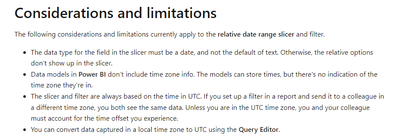
Also check if there is an exception between the local time and the utc time on the service.
If the error persists, can you provide the visual screenshots related to your normal situation in powerbi desktop and the information about the measure formula created, etc.? Looking forward to your reply.
Best Regards,
Henry
If this post helps, then please consider Accept it as the solution to help the other members find it more quickly.
Check out the April 2026 Power BI update to learn about new features.
Sign up to receive a private message when registration opens and key events begin.
If you have recently started exploring Fabric, we'd love to hear how it's going. Your feedback can help with product improvements.
| User | Count |
|---|---|
| 12 | |
| 9 | |
| 8 | |
| 8 | |
| 7 |
| User | Count |
|---|---|
| 50 | |
| 27 | |
| 24 | |
| 24 | |
| 22 |