
cancel
Showing results for 
Search instead for 
Did you mean: 

Next up in the FabCon + SQLCon recap series: The roadmap for Microsoft SQL and Maximizing Developer experiences in Fabric. All sessions are available on-demand after the live show. Register now

Reply
Anonymous
Not applicable

Data refresh errors

Hello all


Apologies if this is a duplicate post, but I am experiencing an error during scheduled and manual refreshes in the Power BI service.


My report uses Google Analaytics and 1 (28Mb) spreadsheet (with multiple data tables in it) as it sources.


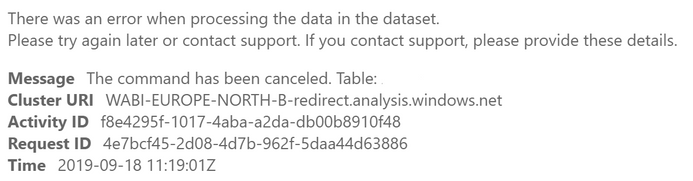
Suddenly my scheduled refresh has failed to work and it quotes the following error:

Snippet.PNG

The name of the table varies every time.


I've searched here and it seems that no-one has found an answer. I've tried re-publishing under a different name, or with a copy of the spreadsheet to no avail.

I've asked my IT team if there is any throttling of data from the file location and they have said no, so I am completely stumped as to why this would suddenly stop working.


It works absolutely fine in Desktop, and refreshes consistently without any errors.


Does anyone have any help or advice to help me remedy this?


Any help is greatly appreciated


Daniel


4 REPLIES 4
Anonymous
Not applicable

Hi @Anonymous ,

I try to use your request id to trace detailed logs but I haven't found clear error message about your issue.  I think it may related to your datasource, is there any changes apply on your datasource side? 

In addition, have you apply any advanced operation in query table?(combine,merge, invoke custom function, reference other query)

Regards,
Xiaoxin Sheng

Anonymous
Not applicable

Hi @Anonymous 


Thanks for your response and for looking through the error log.


The only change I made to the data source was to add another standard table in Excel, but there was nothing strange about that to my knowledge (i.e. it was a standard Excel spreadsheet with manually typed data into it)

I have not invoked any advanced operations to my knowledge, although my queries are linked.


I'd upload the PBIX but its deemed commercially sensitive so I'm not allowed!


I've read about throttling data when using Sharepoint as a source, could this possibly be the cause?


Daniel

Anonymous
Not applicable

HI @Anonymous ,

Where are your excel stored? local or online?(sharepoint/onedrive)  If you mean online files and get data with web connector, it may managed by onedrive refresh(updated per hour) and not triggered by scheduler refresh.

In addition, you can also submit a support ticket for better support.(I can't find clear caused of your issue in error message)

submit a support ticketsubmit a support ticket

Regards,

Xiaoxin Sheng

Anonymous
Not applicable

Hi @Anonymous 


The source document is stored in a Sharepoint document library. I don't use OneDrive for storing this.


I do use the web connector to link Power BI to the dataset, but never had issues with it before.


I'll get a ticket logged, but feel free to message here if you find anything 🙂


Daniel

Helpful resources

Announcements
New to Fabric survey Carousel

New to Fabric Survey

If you have recently started exploring Fabric, we'd love to hear how it's going. Your feedback can help with product improvements.

Power BI DataViz World Championships carousel

Power BI DataViz World Championships - June 2026

A new Power BI DataViz World Championship is coming this June! Don't miss out on submitting your entry.

Join our Fabric User Panel

Join our Fabric User Panel

Share feedback directly with Fabric product managers, participate in targeted research studies and influence the Fabric roadmap.

March Power BI Update Carousel

Power BI Community Update - March 2026

Check out the March 2026 Power BI update to learn about new features.