cancel
Showing results for 
Search instead for 
Did you mean: 

The Power BI Data Visualization World Championships is back! Get ahead of the game and start preparing now! Learn more

Reply
P_Crane31
Frequent Visitor

Data model refreshes on Desktop but not Service: can't figure out error codes

To start off, I'm rather new to PBI so I'm kinda building the airplane while in its in flight.


I am trying to set up a set of reports that refresh often (no fixed time need, but more often than every 30 minutes). My research has led me to Direct Query. My data lives in the cloud and it is PostgreSQL with a Personal Gateway and a "PRO" account.


To do ODBCPostgresDirect I apparently needed a custom data connector (??) which I got and installed from these links:

 "DirectQuery with Postgres from PowerBI Desktop | by Scott Goley | Just Readr the Instructions | Med... 

and 

Connector extensibility in Power BI. 

So I'm pretty sure I have a functioning ODBC driver (Unicode x64) and system DNS. I say that because I can load and refresh my data model on the PBI desktop app. I hit the wall when I try to use the reports on PBI Service. 


When I do a manual refresh I get the little orange triangle with the error message:
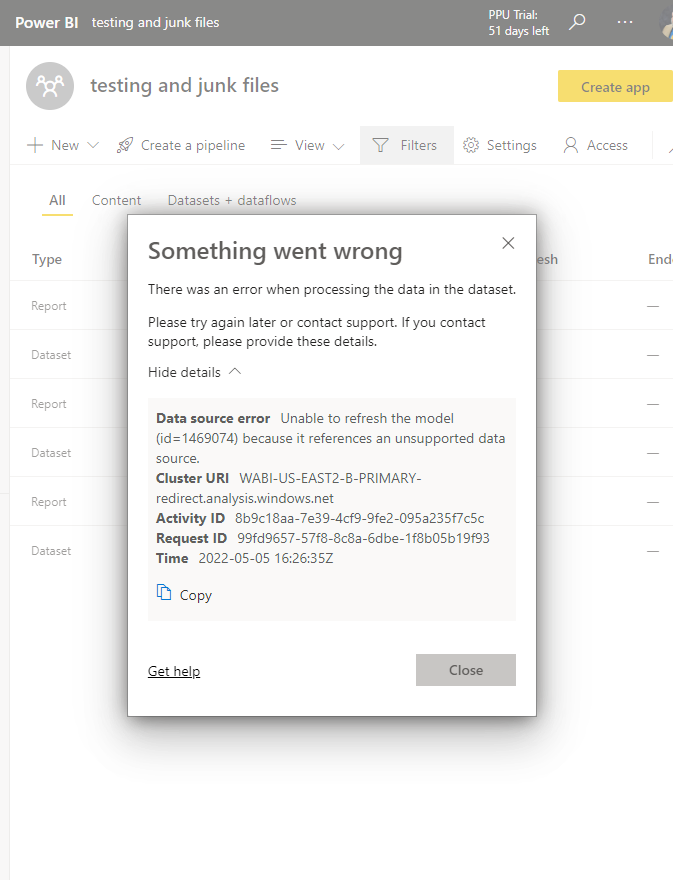
 

5-5-22_Error_screen grab.png


Going into the settings I'm presented with: 
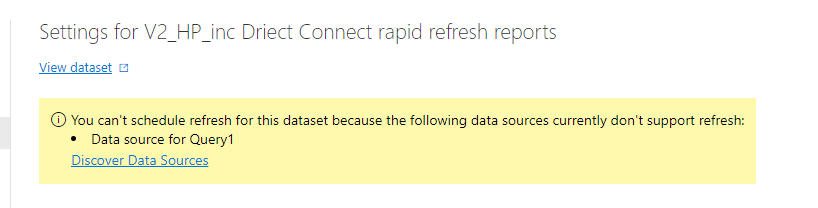
 

Settings error _1.png


After trying "Discover data sources" I get this response:
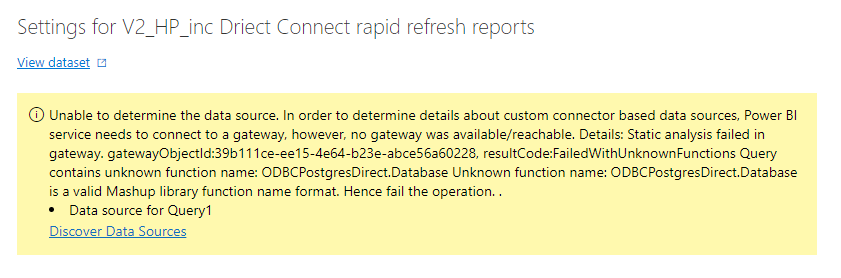
 

Settings error _2.png


My Google-Fu has reached it's limits. 


Thank You!

1 ACCEPTED SOLUTION

Thanks again for responding @GilbertQ ,

As it turns out, I had forgotten that I moved our gateway to a different machine from the one I'm working on currently. Once I logged this machine in to the gateway, everything worked fine. 


P.


View solution in original post

3 REPLIES 3
P_Crane31
Frequent Visitor

Hi @GilbertQ. Unfortunately none of those steps helped. When I use the native data source PBI won't connect (connection time out). If it helps, Ive only had success with ODBC connections (hence that 3rd party connector). 

GilbertQ
Super User
Super User

Hi @P_Crane31 


I would use the native Power BI Data source as shown below

GilbertQ_0-1651789332867.png


When you connect to the data it should then ask you if you would like to import it or DirectQuery. You select DirectQuery.


Then in your gateway you would need to configure the connection details with username and password to connect via the gateway through to your database.


Power BI data sources - Power BI | Microsoft Docs

Power Query PostgreSQL connector - Power Query | Microsoft Docs


Did I answer your question? Mark my post as a solution!

Proud to be a Super User!


Power BI Blog

Thanks again for responding @GilbertQ ,

As it turns out, I had forgotten that I moved our gateway to a different machine from the one I'm working on currently. Once I logged this machine in to the gateway, everything worked fine. 


P.


Helpful resources

Announcements
Power BI DataViz World Championships

Power BI Dataviz World Championships

The Power BI Data Visualization World Championships is back! Get ahead of the game and start preparing now!

November Power BI Update Carousel

Power BI Monthly Update - November 2025

Check out the November 2025 Power BI update to learn about new features.

FabCon Atlanta 2026 carousel

FabCon Atlanta 2026

Join us at FabCon Atlanta, March 16-20, for the ultimate Fabric, Power BI, AI and SQL community-led event. Save $200 with code FABCOMM.