Join us at FabCon Atlanta from March 16 - 20, 2026, for the ultimate Fabric, Power BI, AI and SQL community-led event. Save $200 with code FABCOMM.
Register now!View all the Fabric Data Days sessions on demand. View schedule
Hi,
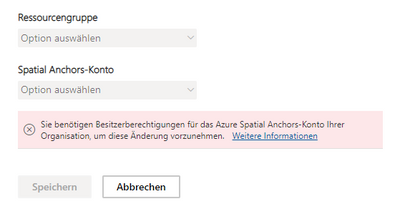
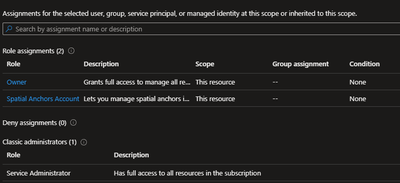
I would like to connect my Azure Spatial Anchors-Account to Power BI in the Admin Center. Unfortunatell there is an error ("You need Admin-Access etc etc.") But I have Admin Rights for Azure Spatial Anchors-Account and Power BI.
So this service is new and in preview. How can I fix it or is it a error from Microsoft site?
Solved! Go to Solution.
Hey, the next day it worked. Obviously our Tennant needs some time for the settings 🙂
Hi @AlexanderKais ,
I did a test with my colleague and it does connect successfully.
Based on the information you provided, we can see that you are a Spatial Anchors owner, but we still need you to reconfirm your Power BI administrator status, what type of Power BI administrator are you?
Connect Power BI to the Azure Spatial Anchors resource
Best Regards,
Community Support Team _ Caitlyn
If this post helps then please consider Accept it as the solution to help the other members find it more quickly.
Hey, the next day it worked. Obviously our Tennant needs some time for the settings 🙂
Check out the November 2025 Power BI update to learn about new features.
Advance your Data & AI career with 50 days of live learning, contests, hands-on challenges, study groups & certifications and more!