cancel
Showing results for 
Search instead for 
Did you mean: 

The Power BI Data Visualization World Championships is back! Get ahead of the game and start preparing now! Learn more

Reply
Anonymous
Not applicable

Data Gateway Mapping Inconsistent with Data Sources

I have a model that is maintained through the XMLA endpoint that contains two data sources both of which need to be mapped through a data gateway. After updating the server name of one of the data sources (via TMSL command), the data gateway connection still lists the previous server name for specifying the mapping. Is there a way to get the gateway mapping to reflect the new server name?


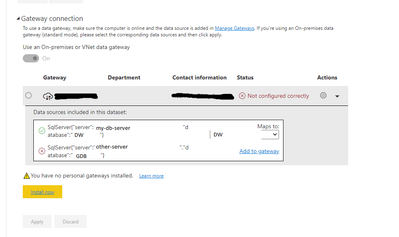
Here is a pic of the mapping (server names redacted), The first source (my-db-server) is correct. The second source uses "other-server", but should be using "my-db-server" as seen in second screenshot.

mytwospence_0-1626795334888.png


Results from running "select * from $system.TMSCHEMA_data_sources" against the dataset using the XMLA endpoint.

mytwospence_1-1626795549068.png


1 ACCEPTED SOLUTION
Anonymous
Not applicable

Thanks for the reply @v-xiaotang . The issue wasn't with the data gateway data source, but the data source in the model itself. Your response did make me think to try deleting the data source in the model with a drop tmsl command, and then run a create tmsl command. Before I was just doing a createOrReplace tmsl command, which apparently doesn't update the data gateway bindings. Thanks for the help!

View solution in original post

2 REPLIES 2
Anonymous
Not applicable

Thanks for the reply @v-xiaotang . The issue wasn't with the data gateway data source, but the data source in the model itself. Your response did make me think to try deleting the data source in the model with a drop tmsl command, and then run a create tmsl command. Before I was just doing a createOrReplace tmsl command, which apparently doesn't update the data gateway bindings. Thanks for the help!

v-xiaotang
Community Support
Community Support

Hi @Anonymous 

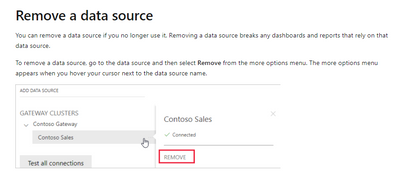
I suggest removing the second data source firstly, and then new a data source with database "GDB"

vxiaotang_0-1626922082703.png


Best Regards,

Community Support Team _ Tang

If this post helps, please consider Accept it as the solution to help the other members find it more quickly.

Helpful resources

Announcements
Power BI DataViz World Championships

Power BI Dataviz World Championships

The Power BI Data Visualization World Championships is back! Get ahead of the game and start preparing now!

December 2025 Power BI Update Carousel

Power BI Monthly Update - December 2025

Check out the December 2025 Power BI Holiday Recap!

FabCon Atlanta 2026 carousel

FabCon Atlanta 2026

Join us at FabCon Atlanta, March 16-20, for the ultimate Fabric, Power BI, AI and SQL community-led event. Save $200 with code FABCOMM.