cancel
Showing results for 
Search instead for 
Did you mean: 

Level up your Power BI skills this month - build one visual each week and tell better stories with data! Get started

Reply
BITSMH
Regular Visitor

Data Exceeded Limit

I set up auto refresh on a report I recently worked on, but the next day received this error: 


"The amount of data on the gateway client has exceeded the limit for a single table. Please consider reducing the use of highly repetitive strings values through normalized keys, removing unused columns, or upgrading to Power BI Premium.

Please try again later or contact support. If you contact support, please provide these details."
 
I deleted a few columns that weren't being used and we upgraded to Premium, but we are still getting the same error. 
 
Here are the details: 
Cluster URI: WABI-US-WEST2-redirect.analysis.windows.net
Activity ID: dada54c8-f920-493b-8710-cc2ce111bc68
Request ID: a079ea3a-458d-3234-345b-5b79823f844a
Time: 2022-01-24 21:23:51Z
1 ACCEPTED SOLUTION
v-chenwuz-msft
Community Support
Community Support

Hi @BITSMH ,


You should check this as following.


Firstly, about whether the premium is set correctly. There are various sku premiums and they have different limits on the size of the dataset .

vchenwuzmsft_0-1643266576269.png


Secondly, make sure that the workload behavior of premium capacity is configured correctly in the admin portal.

service admin premium workloads 


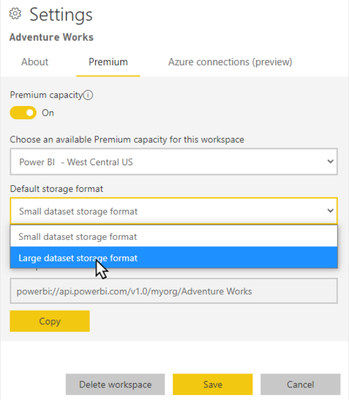
Thirdly, enable large dataset in power bi permiumLarge datasets in the service do not affect the Power BI Desktop model upload size, which is still limited to 10 GB. Instead, datasets can grow beyond that limit in the service on refresh.
vchenwuzmsft_1-1643267543533.png


Fourth, as the error message says, reduce the use of highly constant, long string values and instead use a normalized key. Add a primary key and move most of the calculations to DAX to limit datasets size, or refer to the method described in this article (How to Minimize Data Load Size for Tables in Power BI ).


Best Regards

Community Support Team _ chenwu zhu


If this post helps, then please consider Accept it as the solution to help the other members find it more quickly.


View solution in original post

2 REPLIES 2
v-chenwuz-msft
Community Support
Community Support

Hi @BITSMH ,


You should check this as following.


Firstly, about whether the premium is set correctly. There are various sku premiums and they have different limits on the size of the dataset .

vchenwuzmsft_0-1643266576269.png


Secondly, make sure that the workload behavior of premium capacity is configured correctly in the admin portal.

service admin premium workloads 


Thirdly, enable large dataset in power bi permiumLarge datasets in the service do not affect the Power BI Desktop model upload size, which is still limited to 10 GB. Instead, datasets can grow beyond that limit in the service on refresh.

vchenwuzmsft_1-1643267543533.png


Fourth, as the error message says, reduce the use of highly constant, long string values and instead use a normalized key. Add a primary key and move most of the calculations to DAX to limit datasets size, or refer to the method described in this article (How to Minimize Data Load Size for Tables in Power BI ).


Best Regards

Community Support Team _ chenwu zhu


If this post helps, then please consider Accept it as the solution to help the other members find it more quickly.


StefanoGrimaldi
Resident Rockstar
Resident Rockstar

try running your data model by dax studio or tabular editor where you can run best practice check on your dataset and run performance test to have a better understanding of where its lacking the performance and failing 


Did I answer your question? Mark my post as a solution! / Did it help? Give some Kudos!

Proud to be a Super User!


Helpful resources

Announcements
April Power BI Update Carousel

Power BI Monthly Update - April 2026

Check out the April 2026 Power BI update to learn about new features.

Fabric SQL PBI Data Days

Data Days 2026 coming soon!

Sign up to receive a private message when registration opens and key events begin.

New to Fabric survey Carousel

New to Fabric Survey

If you have recently started exploring Fabric, we'd love to hear how it's going. Your feedback can help with product improvements.

Power BI DataViz World Championships carousel

Power BI DataViz World Championships - June 2026

A new Power BI DataViz World Championship is coming this June! Don't miss out on submitting your entry.