cancel
Showing results for 
Search instead for 
Did you mean: 

We've captured the moments from FabCon & SQLCon that everyone is talking about, and we are bringing them to the community, live and on-demand. Starts on April 14th. Register now

Reply
Bokazoit
Continued Contributor

Dashboard with odd functionality

I have a workspace - lets call it W1 and in that workspace, every user in my company can see all the reports in that workspace. I have one report - 'HR data' that retrieves data from a power BI dataset that I have in a hidden workspace - Called 'Data hidden', and the permission to read, so that reports in Workspace W1 can show charts etc. All other datasets are placed in a Workspace called 'Data visible' so that people can use 'Analyze in Excel' and other stuff.


Everything works fine, and today I created a dashboard and reports in W1 is placed nively in the dashboard except for the report HR data. I can choose to add the report to my dashboard but the page shows a /!\ and a text saying 'data' not available or something. But when the user looking the dashboard opens the report 'HR data' he sees the report.


So what is wrong. I can not figure out what the problem is since he can see the report in the workspace, but not in the dashboard?

1 ACCEPTED SOLUTION
Bokazoit
Continued Contributor

It seems as for som odd reason, that I have to use the option 'Share again' to enable it. I have no clue why, but that did the trick 😛

View solution in original post

2 REPLIES 2
Bokazoit
Continued Contributor

It seems as for som odd reason, that I have to use the option 'Share again' to enable it. I have no clue why, but that did the trick 😛

collinq
Super User
Super User

Hi @Bokazoit ,


This might be a bit tricky, but you have potentially three levels of permissions here.  You have Workspace, Report and Dashboard.  I am assuming that the user in question is internal and has a license to view the data, right?

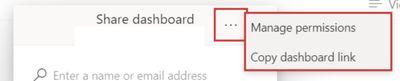
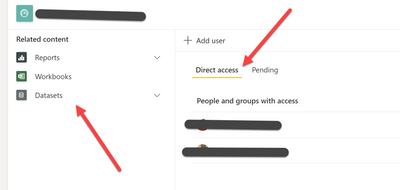
Assuming that is true, then my guess is that you ahve shared the Report and not shared the Dashboard.  One way to see what permissions are where is to go to see who has Direct Access to what.  Go to the Dashboard and select the Share Dashboard and then select the elipses and click on Manage Permissions. 


Dash1.jpg


Click on Advanced and then you can see whom has Direct Access to what....

collinq_1-1642441667844.png


Did I answer your question? Mark my post as a solution!

Proud to be a Datanaut!
Private message me for consulting or training needs.


Helpful resources

Announcements
New to Fabric survey Carousel

New to Fabric Survey

If you have recently started exploring Fabric, we'd love to hear how it's going. Your feedback can help with product improvements.

Power BI DataViz World Championships carousel

Power BI DataViz World Championships - June 2026

A new Power BI DataViz World Championship is coming this June! Don't miss out on submitting your entry.

Join our Fabric User Panel

Join our Fabric User Panel

Share feedback directly with Fabric product managers, participate in targeted research studies and influence the Fabric roadmap.

March Power BI Update Carousel

Power BI Community Update - March 2026

Check out the March 2026 Power BI update to learn about new features.

Top Solution Authors