cancel
Showing results for 
Search instead for 
Did you mean: 

We've captured the moments from FabCon & SQLCon that everyone is talking about, and we are bringing them to the community, live and on-demand. Starts on April 14th. Register now

Reply
Anonymous
Not applicable

Custom Visual drag visual

Hey everyone,


I have developed a custom visual and I would like to be able to drag it around so that it is positioned properly in my report. I am trying to drag it around in PBI service but the only way to move it seems to be to resize it. Any help is appreciated.


Best,

Zohaib

1 ACCEPTED SOLUTION

Hi @Anonymous ,


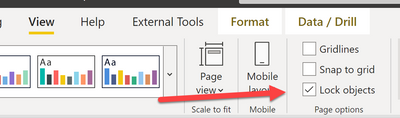
Do you have the "lock objects" turned on?

collinq_0-1624469654454.png


Did I answer your question? Mark my post as a solution!

Proud to be a Datanaut!
Private message me for consulting or training needs.


View solution in original post

4 REPLIES 4
collinq
Super User
Super User

Hi @Anonymous ,


The solutions that I have seen to being able to move visuals around when they are stuck is to try it in a different browser (if you are in the service).  Or, to clear your cache in the Desktop and then try.  Or, to make sure that your Power BI Desktop version is current.  Or, to reboot your computer.  Let us know if that helps.


Did I answer your question? Mark my post as a solution!

Proud to be a Datanaut!
Private message me for consulting or training needs.


Anonymous
Not applicable

Hey so I tried to move the visual in Chrome and it still did not move. I cleared the cache and it was also not moving. I forgot to point out earlier but the visual I am trying to move around is the developer visual which displays the visual I developed.

Hi @Anonymous ,


Do you have the "lock objects" turned on?

collinq_0-1624469654454.png


Did I answer your question? Mark my post as a solution!

Proud to be a Datanaut!
Private message me for consulting or training needs.


Anonymous
Not applicable

Hey 


So I don't have lock objects turned on. I was able to drag it around though. There is a small

area near the visual's edge where I am able to click and drag it. Since my visual intercepts

mouse clicks, that could be why I am not able to drag by clicking and holding inside of my

visual. 

Helpful resources

Announcements
New to Fabric survey Carousel

New to Fabric Survey

If you have recently started exploring Fabric, we'd love to hear how it's going. Your feedback can help with product improvements.

Power BI DataViz World Championships carousel

Power BI DataViz World Championships - June 2026

A new Power BI DataViz World Championship is coming this June! Don't miss out on submitting your entry.

Join our Fabric User Panel

Join our Fabric User Panel

Share feedback directly with Fabric product managers, participate in targeted research studies and influence the Fabric roadmap.

March Power BI Update Carousel

Power BI Community Update - March 2026

Check out the March 2026 Power BI update to learn about new features.