FabCon is coming to Atlanta
Join us at FabCon Atlanta from March 16 - 20, 2026, for the ultimate Fabric, Power BI, AI and SQL community-led event. Save $200 with code FABCOMM.
Register now!- Power BI forums
- Get Help with Power BI
- Desktop
- Service
- Report Server
- Power Query
- Mobile Apps
- Developer
- DAX Commands and Tips
- Custom Visuals Development Discussion
- Health and Life Sciences
- Power BI Spanish forums
- Translated Spanish Desktop
- Training and Consulting
- Instructor Led Training
- Dashboard in a Day for Women, by Women
- Galleries
- Data Stories Gallery
- Themes Gallery
- Contests Gallery
- QuickViz Gallery
- Quick Measures Gallery
- Visual Calculations Gallery
- Notebook Gallery
- Translytical Task Flow Gallery
- TMDL Gallery
- R Script Showcase
- Webinars and Video Gallery
- Ideas
- Custom Visuals Ideas (read-only)
- Issues
- Issues
- Events
- Upcoming Events
The Power BI Data Visualization World Championships is back! Get ahead of the game and start preparing now! Learn more
- Power BI forums
- Forums
- Get Help with Power BI
- Service
- Custom Rscript - problem with published DiagrammeR...
- Subscribe to RSS Feed
- Mark Topic as New
- Mark Topic as Read
- Float this Topic for Current User
- Bookmark
- Subscribe
- Printer Friendly Page

- Mark as New
- Bookmark
- Subscribe
- Mute
- Subscribe to RSS Feed
- Permalink
- Report Inappropriate Content
Custom Rscript - problem with published DiagrammeR. attr_theme doesn't refer to any available theme
Hello,
I have quite a bizzare error. On PowerBI desktop everything works flawlessly. But when I publish report online I receive an error on Rsctipt Visual. attr_theme does not refer to anything while clearly it refers to working attribute.

Code looks like this:
# The following code to create a dataframe and remove duplicated rows is always executed and acts as a preamble for your script:

# dataset <- data.frame(Ship From, Ship To, volume)
# dataset <- unique(dataset)

# Paste or type your script code here:


library(DiagrammeR)
uniquenodes <- unique(c(dataset$'Ship From', dataset$'Ship To'))
uniquenodes
options(scipen=99)


nodes <- create_node_df(n=length(uniquenodes),
                        label=uniquenodes,
                        color="DodgerBlue",
                        fillcolor ="GhostWhite",
                        shape ="rectangle",
                        fontcolor ="RoyalBlue4",
                        penwidth =2,
                        fontsize =16,
                        height =0.5,
                        width =0.7,
                        mindist =5)

edges <- create_edge_df(from =match(dataset$'Ship From', uniquenodes),
                        to =match(dataset$'Ship To', uniquenodes),
                        rel ="leads_to",
                        label =dataset$volume,
                        fontsize =14,
                        color ="SlateGray",
                        penwidth =2,
                        arrowsize =1)

g <- create_graph(nodes_df=nodes,
                  edges_df =edges,
                  directed =TRUE,
                  attr_theme ="lr")

tmp <- export_graph(g, file_name ="image.png", file_type ="png")
the custom Rscript visual renders in Desktop version as follows:
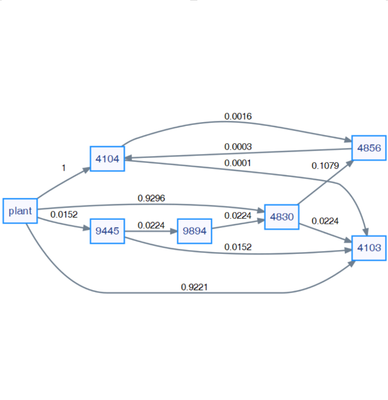
my question is. How is it possible that Rscript renders on desktop correctly and not on published web version?
Best Regards
Solved! Go to Solution.
- Mark as New
- Bookmark
- Subscribe
- Mute
- Subscribe to RSS Feed
- Permalink
- Report Inappropriate Content
Hello,
@v-yanjiang-msft I was able to fix this. Apparently Power BI handles characters differently than R.
First I assigned layout attribute not in create_graph function but in add_global_graph_attrs as "layout" and "rankdir" which eliminated the issue.
dataset$'Ship From' <- as.character(dataset$'Ship From')
dataset$'Ship To' <- as.character(dataset$'Ship To')
Then I changed uniquenodes values from integers to characters to able Power BI to match the values. with piping.
g <- create_graph(nodes_df = nodes,
                  edges_df = edges,
                  directed = TRUE) %>% add_global_graph_attrs(
                    attr = c("layout", "rankdir"),
                    value = c("dot", "LR"),
                    attr_type = c("graph", "graph")
                  )
the whole code looks like this:
# The following code to create a dataframe and remove duplicated rows is always executed and acts as a preamble for your script:

# dataset <- data.frame(Ship From, Ship To, volume)
# dataset <- unique(dataset)

# Paste or type your script code here:

library(DiagrammeR)
options(scipen = 99)
dataset$'Ship From' <- as.character(dataset$'Ship From')
dataset$'Ship To' <- as.character(dataset$'Ship To')
uniquenodes <- unique(c(dataset$'Ship From', dataset$'Ship To'))

nodes <- create_node_df(
  n = length(uniquenodes),
  label = uniquenodes,
  type = uniquenodes,
  color = "DodgerBlue",
  fillcolor = "GhostWhite",
  shape = "rectangle",
  fontcolor = "RoyalBlue4",
  penwidth = 2,
  fontsize = 16,
  height = 0.5,
  width = 0.7,
  mindist = 5
)

edges <-
  create_edge_df(
    from = factor(dataset$'Ship From', levels = uniquenodes),
    to = factor(dataset$'Ship To', levels = uniquenodes),
    rel = "leading_to",
    label = dataset$volume,
    fontsize = 14,
    color = "SlateGray",
    penwidth = 2,
    arrowsize = 1
  )

g <- create_graph(nodes_df = nodes,
                  edges_df = edges,
                  directed = TRUE) %>% add_global_graph_attrs(
                    attr = c("layout", "rankdir"),
                    value = c("dot", "LR"),
                    attr_type = c("graph", "graph")
                  )

tmp <- export_graph(g, file_name = "image.png", file_type = "png")
- Mark as New
- Bookmark
- Subscribe
- Mute
- Subscribe to RSS Feed
- Permalink
- Report Inappropriate Content
Hello,
I was able to fix this. Apparently Power BI handles characters differently than R.
First I assigned layout attribute not in create_graph function but in add_global_graph_attrs as "layout" and "rankdir" which eliminated the issue.
dataset$'Ship From' <- as.character(dataset$'Ship From')
dataset$'Ship To' <- as.character(dataset$'Ship To')
Then I changed uniquenodes values from integers to characters to able Power BI to match the values. with piping.
g <- create_graph(nodes_df = nodes,
                  edges_df = edges,
                  directed = TRUE) %>% add_global_graph_attrs(
                    attr = c("layout", "rankdir"),
                    value = c("dot", "LR"),
                    attr_type = c("graph", "graph")
                  )
the whole code looks like this:
# The following code to create a dataframe and remove duplicated rows is always executed and acts as a preamble for your script:

# dataset <- data.frame(Ship From, Ship To, volume)
# dataset <- unique(dataset)

# Paste or type your script code here:

library(DiagrammeR)
options(scipen = 99)
dataset$'Ship From' <- as.character(dataset$'Ship From')
dataset$'Ship To' <- as.character(dataset$'Ship To')
uniquenodes <- unique(c(dataset$'Ship From', dataset$'Ship To'))

nodes <- create_node_df(
  n = length(uniquenodes),
  label = uniquenodes,
  type = uniquenodes,
  color = "DodgerBlue",
  fillcolor = "GhostWhite",
  shape = "rectangle",
  fontcolor = "RoyalBlue4",
  penwidth = 2,
  fontsize = 16,
  height = 0.5,
  width = 0.7,
  mindist = 5
)

edges <-
  create_edge_df(
    from = factor(dataset$'Ship From', levels = uniquenodes),
    to = factor(dataset$'Ship To', levels = uniquenodes),
    rel = "leading_to",
    label = dataset$volume,
    fontsize = 14,
    color = "SlateGray",
    penwidth = 2,
    arrowsize = 1
  )

g <- create_graph(nodes_df = nodes,
                  edges_df = edges,
                  directed = TRUE) %>% add_global_graph_attrs(
                    attr = c("layout", "rankdir"),
                    value = c("dot", "LR"),
                    attr_type = c("graph", "graph")
                  )

tmp <- export_graph(g, file_name = "image.png", file_type = "png")


- Mark as New
- Bookmark
- Subscribe
- Mute
- Subscribe to RSS Feed
- Permalink
- Report Inappropriate Content
Hi @Anonymous ,
There are some limitations when you use R script on power bi service, you can take the following links for reference:
Creating R visuals in the Power BI service
R packages in the Power BI service
As the document states that custom R packages are not supported in Power BI Service.
Known Limitations
R visuals in the Power BI service have a few limitations:
R visuals support is limited to the packages identified in Learn which R packages are supported. There currently is no support for custom packages.
Best Regards,
Community Support Team _ kalyj
If this post helps, then please consider Accept it as the solution to help the other members find it more quickly.
- Mark as New
- Bookmark
- Subscribe
- Mute
- Subscribe to RSS Feed
- Permalink
- Report Inappropriate Content
Hello,
@v-yanjiang-msft I was able to fix this. Apparently Power BI handles characters differently than R.
First I assigned layout attribute not in create_graph function but in add_global_graph_attrs as "layout" and "rankdir" which eliminated the issue.
dataset$'Ship From' <- as.character(dataset$'Ship From')
dataset$'Ship To' <- as.character(dataset$'Ship To')
Then I changed uniquenodes values from integers to characters to able Power BI to match the values. with piping.
g <- create_graph(nodes_df = nodes,
                  edges_df = edges,
                  directed = TRUE) %>% add_global_graph_attrs(
                    attr = c("layout", "rankdir"),
                    value = c("dot", "LR"),
                    attr_type = c("graph", "graph")
                  )
the whole code looks like this:
# The following code to create a dataframe and remove duplicated rows is always executed and acts as a preamble for your script:

# dataset <- data.frame(Ship From, Ship To, volume)
# dataset <- unique(dataset)

# Paste or type your script code here:

library(DiagrammeR)
options(scipen = 99)
dataset$'Ship From' <- as.character(dataset$'Ship From')
dataset$'Ship To' <- as.character(dataset$'Ship To')
uniquenodes <- unique(c(dataset$'Ship From', dataset$'Ship To'))

nodes <- create_node_df(
  n = length(uniquenodes),
  label = uniquenodes,
  type = uniquenodes,
  color = "DodgerBlue",
  fillcolor = "GhostWhite",
  shape = "rectangle",
  fontcolor = "RoyalBlue4",
  penwidth = 2,
  fontsize = 16,
  height = 0.5,
  width = 0.7,
  mindist = 5
)

edges <-
  create_edge_df(
    from = factor(dataset$'Ship From', levels = uniquenodes),
    to = factor(dataset$'Ship To', levels = uniquenodes),
    rel = "leading_to",
    label = dataset$volume,
    fontsize = 14,
    color = "SlateGray",
    penwidth = 2,
    arrowsize = 1
  )

g <- create_graph(nodes_df = nodes,
                  edges_df = edges,
                  directed = TRUE) %>% add_global_graph_attrs(
                    attr = c("layout", "rankdir"),
                    value = c("dot", "LR"),
                    attr_type = c("graph", "graph")
                  )

tmp <- export_graph(g, file_name = "image.png", file_type = "png")
Helpful resources

Power BI Dataviz World Championships
The Power BI Data Visualization World Championships is back! Get ahead of the game and start preparing now!

Power BI Monthly Update - December 2025
Check out the December 2025 Power BI Holiday Recap!

FabCon Atlanta 2026
Join us at FabCon Atlanta, March 16-20, for the ultimate Fabric, Power BI, AI and SQL community-led event. Save $200 with code FABCOMM.


| User | Count |
|---|---|
| 50 | |
| 49 | |
| 44 | |
| 16 | |
| 16 |


