Share feedback directly with Fabric product managers, participate in targeted research studies and influence the Fabric roadmap.
Sign up nowGet Fabric certified for FREE! Don't miss your chance! Learn more
Hello,
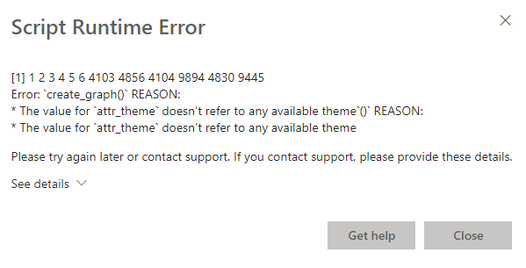
I have quite a bizzare error. On PowerBI desktop everything works flawlessly. But when I publish report online I receive an error on Rsctipt Visual. attr_theme does not refer to anything while clearly it refers to working attribute.
Code looks like this:
# The following code to create a dataframe and remove duplicated rows is always executed and acts as a preamble for your script:
# dataset <- data.frame(Ship From, Ship To, volume)
# dataset <- unique(dataset)
# Paste or type your script code here:
library(DiagrammeR)
uniquenodes <- unique(c(dataset$'Ship From', dataset$'Ship To'))
uniquenodes
options(scipen=99)
nodes <- create_node_df(n=length(uniquenodes),
label=uniquenodes,
color="DodgerBlue",
fillcolor ="GhostWhite",
shape ="rectangle",
fontcolor ="RoyalBlue4",
penwidth =2,
fontsize =16,
height =0.5,
width =0.7,
mindist =5)
edges <- create_edge_df(from =match(dataset$'Ship From', uniquenodes),
to =match(dataset$'Ship To', uniquenodes),
rel ="leads_to",
label =dataset$volume,
fontsize =14,
color ="SlateGray",
penwidth =2,
arrowsize =1)
g <- create_graph(nodes_df=nodes,
edges_df =edges,
directed =TRUE,
attr_theme ="lr")
tmp <- export_graph(g, file_name ="image.png", file_type ="png")
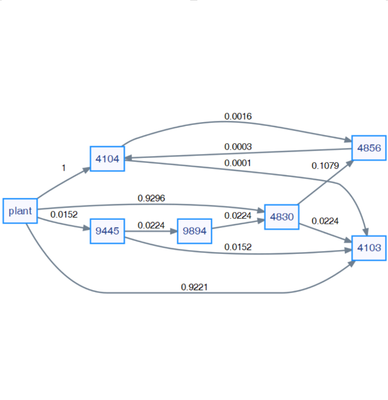
the custom Rscript visual renders in Desktop version as follows:
my question is. How is it possible that Rscript renders on desktop correctly and not on published web version?
Best Regards
Solved! Go to Solution.
Hello,
@v-yanjiang-msft I was able to fix this. Apparently Power BI handles characters differently than R.
First I assigned layout attribute not in create_graph function but in add_global_graph_attrs as "layout" and "rankdir" which eliminated the issue.
dataset$'Ship From' <- as.character(dataset$'Ship From')
dataset$'Ship To' <- as.character(dataset$'Ship To')
Then I changed uniquenodes values from integers to characters to able Power BI to match the values. with piping.
g <- create_graph(nodes_df = nodes,
edges_df = edges,
directed = TRUE) %>% add_global_graph_attrs(
attr = c("layout", "rankdir"),
value = c("dot", "LR"),
attr_type = c("graph", "graph")
)
the whole code looks like this:
# The following code to create a dataframe and remove duplicated rows is always executed and acts as a preamble for your script:
# dataset <- data.frame(Ship From, Ship To, volume)
# dataset <- unique(dataset)
# Paste or type your script code here:
library(DiagrammeR)
options(scipen = 99)
dataset$'Ship From' <- as.character(dataset$'Ship From')
dataset$'Ship To' <- as.character(dataset$'Ship To')
uniquenodes <- unique(c(dataset$'Ship From', dataset$'Ship To'))
nodes <- create_node_df(
n = length(uniquenodes),
label = uniquenodes,
type = uniquenodes,
color = "DodgerBlue",
fillcolor = "GhostWhite",
shape = "rectangle",
fontcolor = "RoyalBlue4",
penwidth = 2,
fontsize = 16,
height = 0.5,
width = 0.7,
mindist = 5
)
edges <-
create_edge_df(
from = factor(dataset$'Ship From', levels = uniquenodes),
to = factor(dataset$'Ship To', levels = uniquenodes),
rel = "leading_to",
label = dataset$volume,
fontsize = 14,
color = "SlateGray",
penwidth = 2,
arrowsize = 1
)
g <- create_graph(nodes_df = nodes,
edges_df = edges,
directed = TRUE) %>% add_global_graph_attrs(
attr = c("layout", "rankdir"),
value = c("dot", "LR"),
attr_type = c("graph", "graph")
)
tmp <- export_graph(g, file_name = "image.png", file_type = "png")
Hello,
I was able to fix this. Apparently Power BI handles characters differently than R.
First I assigned layout attribute not in create_graph function but in add_global_graph_attrs as "layout" and "rankdir" which eliminated the issue.
dataset$'Ship From' <- as.character(dataset$'Ship From')
dataset$'Ship To' <- as.character(dataset$'Ship To')
Then I changed uniquenodes values from integers to characters to able Power BI to match the values. with piping.
g <- create_graph(nodes_df = nodes,
edges_df = edges,
directed = TRUE) %>% add_global_graph_attrs(
attr = c("layout", "rankdir"),
value = c("dot", "LR"),
attr_type = c("graph", "graph")
)
the whole code looks like this:
# The following code to create a dataframe and remove duplicated rows is always executed and acts as a preamble for your script:
# dataset <- data.frame(Ship From, Ship To, volume)
# dataset <- unique(dataset)
# Paste or type your script code here:
library(DiagrammeR)
options(scipen = 99)
dataset$'Ship From' <- as.character(dataset$'Ship From')
dataset$'Ship To' <- as.character(dataset$'Ship To')
uniquenodes <- unique(c(dataset$'Ship From', dataset$'Ship To'))
nodes <- create_node_df(
n = length(uniquenodes),
label = uniquenodes,
type = uniquenodes,
color = "DodgerBlue",
fillcolor = "GhostWhite",
shape = "rectangle",
fontcolor = "RoyalBlue4",
penwidth = 2,
fontsize = 16,
height = 0.5,
width = 0.7,
mindist = 5
)
edges <-
create_edge_df(
from = factor(dataset$'Ship From', levels = uniquenodes),
to = factor(dataset$'Ship To', levels = uniquenodes),
rel = "leading_to",
label = dataset$volume,
fontsize = 14,
color = "SlateGray",
penwidth = 2,
arrowsize = 1
)
g <- create_graph(nodes_df = nodes,
edges_df = edges,
directed = TRUE) %>% add_global_graph_attrs(
attr = c("layout", "rankdir"),
value = c("dot", "LR"),
attr_type = c("graph", "graph")
)
tmp <- export_graph(g, file_name = "image.png", file_type = "png")
Hi @Anonymous ,
There are some limitations when you use R script on power bi service, you can take the following links for reference:
Creating R visuals in the Power BI service
R packages in the Power BI service
As the document states that custom R packages are not supported in Power BI Service.
Known Limitations
R visuals in the Power BI service have a few limitations:
R visuals support is limited to the packages identified in Learn which R packages are supported. There currently is no support for custom packages.
Best Regards,
Community Support Team _ kalyj
If this post helps, then please consider Accept it as the solution to help the other members find it more quickly.
Hello,
@v-yanjiang-msft I was able to fix this. Apparently Power BI handles characters differently than R.
First I assigned layout attribute not in create_graph function but in add_global_graph_attrs as "layout" and "rankdir" which eliminated the issue.
dataset$'Ship From' <- as.character(dataset$'Ship From')
dataset$'Ship To' <- as.character(dataset$'Ship To')
Then I changed uniquenodes values from integers to characters to able Power BI to match the values. with piping.
g <- create_graph(nodes_df = nodes,
edges_df = edges,
directed = TRUE) %>% add_global_graph_attrs(
attr = c("layout", "rankdir"),
value = c("dot", "LR"),
attr_type = c("graph", "graph")
)
the whole code looks like this:
# The following code to create a dataframe and remove duplicated rows is always executed and acts as a preamble for your script:
# dataset <- data.frame(Ship From, Ship To, volume)
# dataset <- unique(dataset)
# Paste or type your script code here:
library(DiagrammeR)
options(scipen = 99)
dataset$'Ship From' <- as.character(dataset$'Ship From')
dataset$'Ship To' <- as.character(dataset$'Ship To')
uniquenodes <- unique(c(dataset$'Ship From', dataset$'Ship To'))
nodes <- create_node_df(
n = length(uniquenodes),
label = uniquenodes,
type = uniquenodes,
color = "DodgerBlue",
fillcolor = "GhostWhite",
shape = "rectangle",
fontcolor = "RoyalBlue4",
penwidth = 2,
fontsize = 16,
height = 0.5,
width = 0.7,
mindist = 5
)
edges <-
create_edge_df(
from = factor(dataset$'Ship From', levels = uniquenodes),
to = factor(dataset$'Ship To', levels = uniquenodes),
rel = "leading_to",
label = dataset$volume,
fontsize = 14,
color = "SlateGray",
penwidth = 2,
arrowsize = 1
)
g <- create_graph(nodes_df = nodes,
edges_df = edges,
directed = TRUE) %>% add_global_graph_attrs(
attr = c("layout", "rankdir"),
value = c("dot", "LR"),
attr_type = c("graph", "graph")
)
tmp <- export_graph(g, file_name = "image.png", file_type = "png")
If you love stickers, then you will definitely want to check out our Community Sticker Challenge!
Check out the January 2026 Power BI update to learn about new features.
| User | Count |
|---|---|
| 18 | |
| 8 | |
| 8 | |
| 7 | |
| 7 |
| User | Count |
|---|---|
| 49 | |
| 45 | |
| 25 | |
| 25 | |
| 25 |