
Join us at FabCon Atlanta from March 16 - 20, 2026, for the ultimate Fabric, Power BI, AI and SQL community-led event. Save $200 with code FABCOMM.
Register now!The Power BI Data Visualization World Championships is back! Get ahead of the game and start preparing now! Learn more
Hello,
I am new in Power BI and are following a course.
I have published my report on app.powerbi.com and want to create an app.
In my course they show me a "create app" button but i cannot find it.
Can somebody help where to find it.
Thanks, Adriaan
You have to create and set a PowerBI app workspace
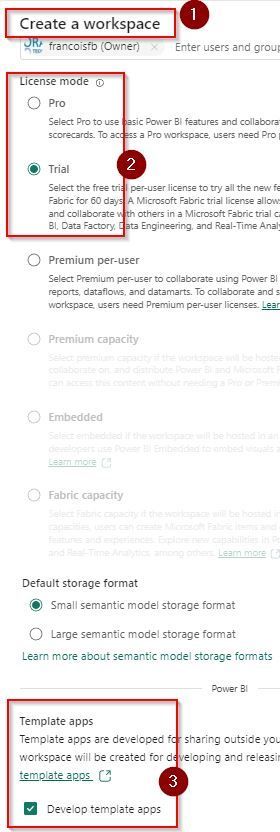
1- Create a workspace
Open the advance section
2-Chose your licences mode
Pro or Trial
3- Open ADVANCE section
Check ''Develop template apps"
app workspaces
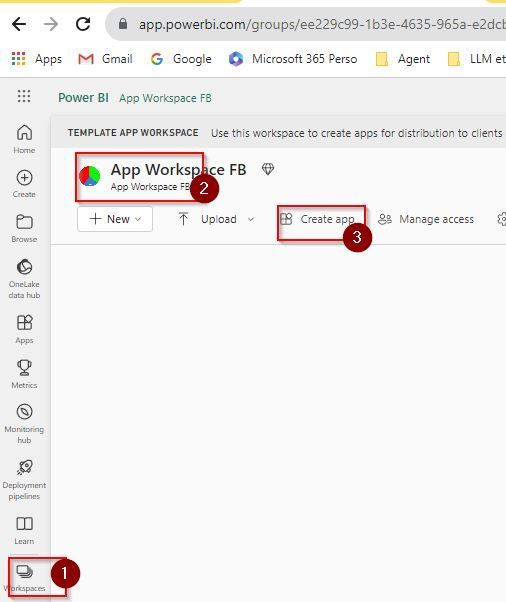
Done, go to the new APP workspace you have build
(et voilà)
app workspace created
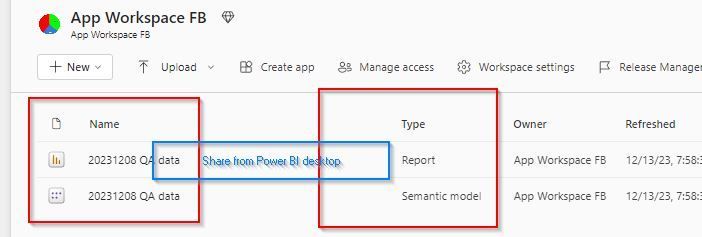
after you go into power BI DESKTOP and share want you need (report, sematic model)
C:\Users\Francoishp2\Downloads\Formation Microsoft\PowerBI app workspace share Power BI Desktop
Frank Quebec
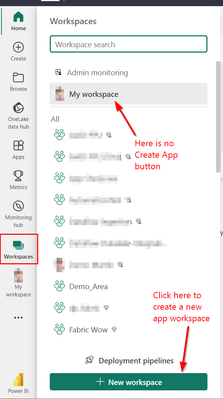
@adriaan70 Be careful with this description. A template app is probably not what you want. So you don't need to check the template app checkbox. A template app is for publishing to the public Microsoft App Store. You need a normal app workspace (most likely). Since Power BI new workspace experience, which should be the standard today, every workspace is an app workspace except the My Workspaces.
You can create one in the Workspaces menu:
Limitations:
BR
Martin
Hi @adriaan70
you need to make sure that your published your report to an App Workspace and NOT to My Workspace?
Hi GilbertQ,
How do i do that, because i have no App Workspace?
The Power BI Data Visualization World Championships is back! Get ahead of the game and start preparing now!
Check out the November 2025 Power BI update to learn about new features.