cancel
Showing results for 
Search instead for 
Did you mean: 

Get Fabric certified for FREE! Don't miss your chance! Learn more

Reply
Anonymous
Not applicable

Create a column with date end

Hi guys,
I have a table like:

Rick_ferreira_0-1619530494728.png

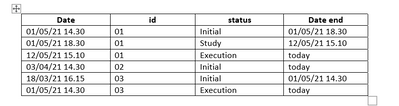
I need to create a column with date end for each status like this:

Rick_ferreira_1-1619530548593.png

Using Dax or M. The date end is the date of beginning of the next status.
Can someone help me? My problem is the format the date because I need to have the date and time. 

Thanks

1 ACCEPTED SOLUTION
v-robertq-msft
Community Support
Community Support

Hi, @Anonymous 

According to your description and the sample picture, I can clearly understand your requirement, you can achieve this using two calculated columns, you can try these calculated columns:

Rank = RANKX(FILTER('Table',[id]=EARLIER([id])),[Date],,ASC,Dense)
Date end =

var _idmaxdate=CALCULATE(MAX([Date]),FILTER(ALL('Table'),[id]=EARLIER([id])))

var _statusmaxdate=CALCULATE(MAX([Date]),FILTER(ALL('Table'),[id]=EARLIER([id])&&[status]=EARLIER([status])))

var _nextdate=CALCULATE(MAX([Date]),FILTER(ALL('Table'),[id]=EARLIER([id])&&[Rank]=EARLIER([Rank])+1))

return

SWITCH(

    TRUE(),

    [Date]=_idmaxdate,"Today",

    [Date]=_statusmaxdate,FORMAT(_nextdate,"yyyy-mm-dd hh:mm:ss"),

    BLANK())


And make sure the data type of the column to be “Text”, you can get what you want, like this:

v-robertq-msft_0-1619677724893.png


You can download my test pbix file below

Thank you very much!


Best Regards,

Community Support Team _Robert Qin

If this post helps, then please consider Accept it as the solution to help the other members find it more quickly.

View solution in original post

3 REPLIES 3
v-robertq-msft
Community Support
Community Support

Hi, @Anonymous 

According to your description and the sample picture, I can clearly understand your requirement, you can achieve this using two calculated columns, you can try these calculated columns:

Rank = RANKX(FILTER('Table',[id]=EARLIER([id])),[Date],,ASC,Dense)
Date end =

var _idmaxdate=CALCULATE(MAX([Date]),FILTER(ALL('Table'),[id]=EARLIER([id])))

var _statusmaxdate=CALCULATE(MAX([Date]),FILTER(ALL('Table'),[id]=EARLIER([id])&&[status]=EARLIER([status])))

var _nextdate=CALCULATE(MAX([Date]),FILTER(ALL('Table'),[id]=EARLIER([id])&&[Rank]=EARLIER([Rank])+1))

return

SWITCH(

    TRUE(),

    [Date]=_idmaxdate,"Today",

    [Date]=_statusmaxdate,FORMAT(_nextdate,"yyyy-mm-dd hh:mm:ss"),

    BLANK())


And make sure the data type of the column to be “Text”, you can get what you want, like this:

v-robertq-msft_0-1619677724893.png


You can download my test pbix file below

Thank you very much!


Best Regards,

Community Support Team _Robert Qin

If this post helps, then please consider Accept it as the solution to help the other members find it more quickly.
selimovd
Super User
Super User

Hey @Anonymous ,


I would happily help you, but where do you get the end date from?


Best regards

Denis

Anonymous
Not applicable

The date end is the date of beginning of the next status.
Thanks

Helpful resources

Announcements
Join our Fabric User Panel

Join our Fabric User Panel

Share feedback directly with Fabric product managers, participate in targeted research studies and influence the Fabric roadmap.

February Power BI Update Carousel

Power BI Monthly Update - February 2026

Check out the February 2026 Power BI update to learn about new features.

FabCon Atlanta 2026 carousel

FabCon Atlanta 2026

Join us at FabCon Atlanta, March 16-20, for the ultimate Fabric, Power BI, AI and SQL community-led event. Save $200 with code FABCOMM.