Share feedback directly with Fabric product managers, participate in targeted research studies and influence the Fabric roadmap.
Sign up nowGet Fabric certified for FREE! Don't miss your chance! Learn more
I down loaded and contected to the data for the ServiceNow Incidents content pack for my DEV ServiceNow instance successfully a couple days ago. I have then since tried to connect to my PROD ServiceNow instance, but have been unable to do so due to a creditentials issue.
I deleted/removed all the content and data fo ServiceNow DEV (Dataset, Report and Dashboard)
I now am trying to recreate this using the Content Pack and now I cannot Edit, Save, etc. the Report, etc.
The Dashboard, Report and Dataset are now in the App are and not in My Workspace or any other Workspace.
How do I get the Content Pack to load into My Workspace again?
Thanks,
Derek
Solved! Go to Solution.
Hi @Anonymous,
It looks like you are trying to connect to ServiceNow content pack, right?
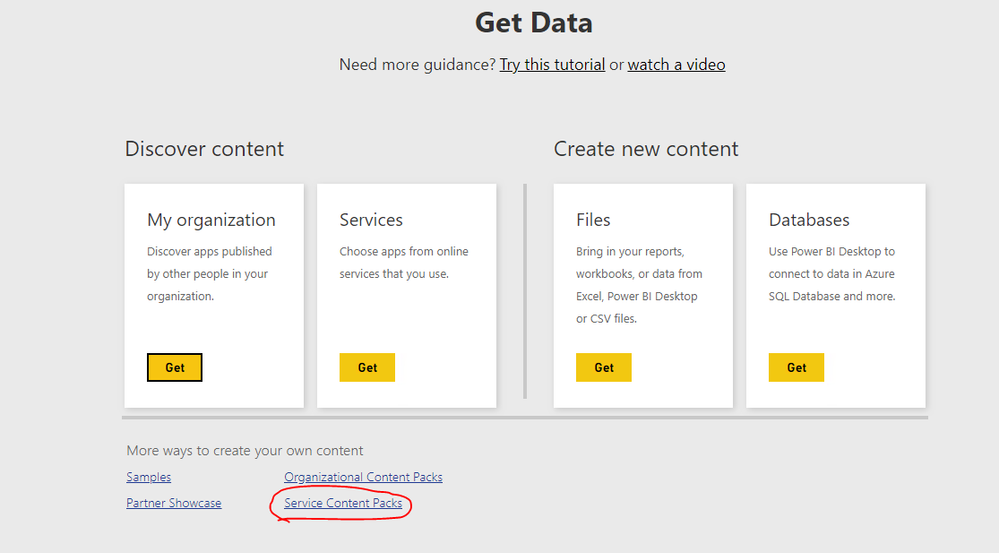
Based on my test, if we click on Get Data -> Service Content Pack-> Servicenow Incidents to import content pack, the report and dashboard and report will display in the workspace instead of apps section. Please test again on your side.
Best Regards,
Qiuyun Yu
Hi Qiuyun Yu,
Many Thanks as this worked and I was able to recreate the dataset, report and dashboard in my workspace!
Derek
Hi Qiuyun Yu,
Issue has been resolved and you can proceed with closing this thread.
Thanks,
Derek
Hi @Anonymous,
As the issue is resolved, may I close this thread?
Best Regards,
Qiuyun Yu
Hi Qiuyun Yu,
Many Thanks as this worked and I was able to recreate the dataset, report and dashboard in my workspace!
Derek
Hi @Anonymous,
It looks like you are trying to connect to ServiceNow content pack, right?
Based on my test, if we click on Get Data -> Service Content Pack-> Servicenow Incidents to import content pack, the report and dashboard and report will display in the workspace instead of apps section. Please test again on your side.
Best Regards,
Qiuyun Yu
If you love stickers, then you will definitely want to check out our Community Sticker Challenge!
Check out the January 2026 Power BI update to learn about new features.
| User | Count |
|---|---|
| 19 | |
| 7 | |
| 7 | |
| 7 | |
| 7 |
| User | Count |
|---|---|
| 51 | |
| 46 | |
| 25 | |
| 25 | |
| 23 |