cancel
Showing results for 
Search instead for 
Did you mean: 

Learn from the best! Meet the four finalists headed to the FINALS of the Power BI Dataviz World Championships! Register now

Reply
dani_scarcella
Frequent Visitor

Connection Error SSAS Gateway

We made the dashboard in the Power Bi Desktop dynamically connecting to the server where the Analisys services model is hosted and it works ok. At the time of publishing the board, we add the source of the data in the Gateway (where it says it connects correctly) and link it to the board's data set. When we want to see the board in the cloud it throws:

 

errorpbi.png


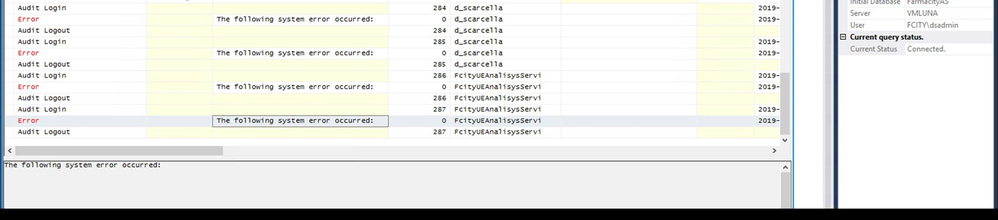
As I saw on the Analysis Services server the connection arrives, but throw an error without detail:


We have two different boards one with my user and one with one of services to see if that was the problem, but it throws the same error for both cases.
From what I saw the domain reaches the server ok, but we cannot find the cause of the error.

3 REPLIES 3
Anonymous
Not applicable

@dani_scarcella 

Error when connecting SSAS can be caused by many reasons. You can troubleshoot with following dirctions:


1. The effective username, the email address must match a defined user principal name (UPN). Check this document for detail: https://docs.microsoft.com/en-us/power-bi/service-gateway-enterprise-manage-ssas 
2. check your AS crendential and roles in the model.

3. Check where the port is blocked 

Best,
Paul

Hi,


1) The email address matches the user principal name (UPN). They are the same.

2) The roles are ok.

3) How i check this?


The error si:

erroras.png

Anonymous
Not applicable

@dani_scarcella 
1. Your users names must be the same format: Domain\username
2. Are you the admin of the instance
3. Are you using Cube or Tabular, and you can check detail with port in this doc: https://docs.microsoft.com/en-us/analysis-services/instances/configure-the-windows-firewall-to-allow... 

Paul

Helpful resources

Announcements
New to Fabric survey Carousel

New to Fabric Survey

If you have recently started exploring Fabric, we'd love to hear how it's going. Your feedback can help with product improvements.

Power BI DataViz World Championships carousel

Power BI DataViz World Championships - June 2026

A new Power BI DataViz World Championship is coming this June! Don't miss out on submitting your entry.

Join our Fabric User Panel

Join our Fabric User Panel

Share feedback directly with Fabric product managers, participate in targeted research studies and influence the Fabric roadmap.

March Power BI Update Carousel

Power BI Community Update - March 2026

Check out the March 2026 Power BI update to learn about new features.

Top Kudoed Authors