Don't miss your chance to take the Fabric Data Engineer (DP-600) exam for FREE! Find out how by attending the DP-600 session on April 23rd (pacific time), live or on-demand.
Learn moreNext up in the FabCon + SQLCon recap series: The roadmap for Microsoft SQL and Maximizing Developer experiences in Fabric. All sessions are available on-demand after the live show. Register now
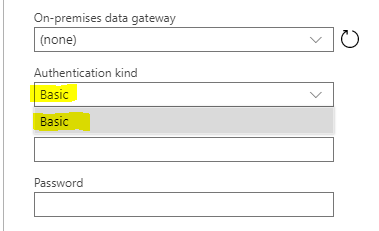
We are trying to create a dataflow that connects to our SQL Server hosted on Azure but we are not getting the option to choose an authentication type other than "Basic". I'm wondering if there is something we need to enable at the administration level that is missing.
I've been combing through documentation but at this point have not found the specific answer. Any help would be appreciated, particularly if it is something we could pass on to our admin (Who is not particularly experienced with Power BI / Azure).
Thanks,
Solved! Go to Solution.
Hi @Anonymous ,
It is not supported to implement your demand in Power BI currently .There is an idea about this issue, please vote it up, https://ideas.powerbi.com/forums/265200-power-bi-ideas/suggestions/37770910-active-directory-microsoft-account-authentication , to improve the Power BI.
It is a place for customers provide feedback about Microsoft Office products . What’s more, if a feedback is high voted there by other customers, it will be promising that Microsoft Product Team will take it into consideration when designing the next version in the future.
We also submitted this feedback to the product group internally, so that the product group can pay attention to this problem and speed up the issue repairing.
Best Regards,
Amy
If this post helps, then please consider Accept it as the solution to help the other members find it more quickly
Hi @Anonymous ,
When you connect to Azure SQL database, please choose Microsoft account option to sign in with your Azure Active Directory account.
You can learn more:
Use Azure Active Directory Authentication for authentication with SQL ,
Configure and manage Azure Active Directory authentication with SQL .
Best Regards,
Amy
If this post helps, then please consider Accept it as the solution to help the other members find it more quickly
Hello,
The problem is that we do not have "Microsoft account" as a sign in option. We have that enabled in our SQL Server already and use Microsoft AD Accounts to log into it. But when trying to connect via Power BI Dataflows we only are given the "Basic" option. If I use Desktop I can use Microsoft Account, but not in Dataflows.
What I'm trying to figure out is whether there is some admin setting that needs to be changed in Power BI to allow for these other signin options.
Hi @Anonymous ,
It is not supported to implement your demand in Power BI currently .There is an idea about this issue, please vote it up, https://ideas.powerbi.com/forums/265200-power-bi-ideas/suggestions/37770910-active-directory-microsoft-account-authentication , to improve the Power BI.
It is a place for customers provide feedback about Microsoft Office products . What’s more, if a feedback is high voted there by other customers, it will be promising that Microsoft Product Team will take it into consideration when designing the next version in the future.
We also submitted this feedback to the product group internally, so that the product group can pay attention to this problem and speed up the issue repairing.
Best Regards,
Amy
If this post helps, then please consider Accept it as the solution to help the other members find it more quickly
If you have recently started exploring Fabric, we'd love to hear how it's going. Your feedback can help with product improvements.
A new Power BI DataViz World Championship is coming this June! Don't miss out on submitting your entry.
Share feedback directly with Fabric product managers, participate in targeted research studies and influence the Fabric roadmap.